How to Get Traffic From Pinterest: A Traffic-First Workflow
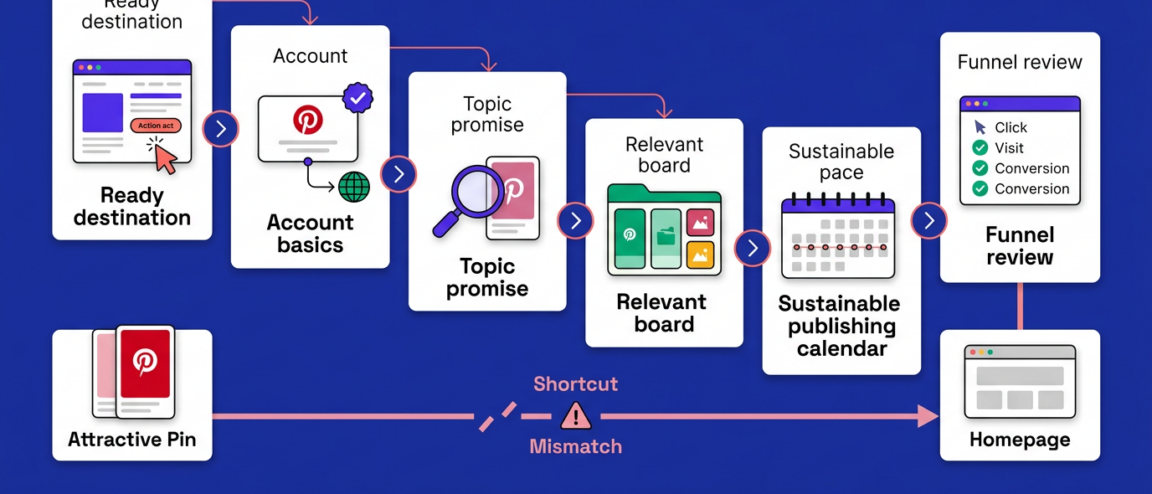
Getting traffic from Pinterest means routing search-relevant Pins to a destination built to satisfy the click. The core sequence:
- Confirm the destination page and its intended visitor action
- Verify account, website, and link foundations before publishing
- Match each Pin’s topic to a clear destination promise
- Place Pins on genuinely relevant boards, not for reach
- Publish sustainably, then compare outbound clicks with website sessions
Most Pinterest advice stops at publishing more Pins, when the real bottleneck usually sits earlier in the chain: a destination that can’t fulfill the Pin’s promise, a mismatched topic, or a measurement gap that hides whether clicks became sessions. This guide treats traffic as the result of a short dependency chain, not a byproduct of activity, and separates Pinterest’s documented policies on spam, automation, and paid content from ordinary creative choices.
On this page
How to get traffic from Pinterest
Traffic from Pinterest comes from a dependency chain, not a single tactic: a ready destination, confirmed account and measurement basics, a topic-matched Pin, correct placement, sustainable publishing, and a funnel review that shows where visitors drop off. Skip an early step and the later ones can’t fix it — a well-made Pin sent to the wrong destination has nowhere good to send its clicks.
- Choose the destination and the visitor action first. Decide which page receives the click and what the visitor should do there before any Pin exists.
- Confirm account, website, and measurement setup. Check that your business profile, website claiming, and destination link support the destination, and that your analytics can register the visit.
- Match a search-relevant topic to that destination’s promise. The words someone would search for should describe exactly what the linked page delivers.
- Place the Pin where it belongs. Publish to a board whose stated topic matches both the Pin and the destination.
- Publish at a sustainable pace. Choose a cadence you can sustain with materially distinct, destination-relevant Pins rather than a volume you can’t keep differentiated.
- Review the funnel and fix the weakest stage. Compare Pinterest’s visibility and interaction figures against referral sessions and your conversion event, and fix the stage that’s actually failing.
This is an editorial sequence, not a description of how Pinterest ranks or distributes content, and following it doesn’t guarantee a specific volume of visitors — it prevents the common failure of polishing Pins while the destination or measurement underneath them was never ready.
What “grow on Pinterest” should mean for your goal
“Growing on Pinterest” only means something once you attach it to a business outcome: referral sessions for a publisher, lead or portfolio contacts for a creator, product or collection actions for an e-commerce marketer, and follower growth only where plain awareness is the actual goal. Saves, closeups, and other in-app reactions are useful feedback on a Pin’s appeal, but they aren’t sessions, leads, or purchases, and treating them as interchangeable hides whether the account is moving the metric that actually matters to the business.
Start with a destination that can satisfy the visitor
The most common mistake in Pinterest traffic work is building the Pin before deciding what the destination has to deliver. A publisher needs a page built around one article or resource action; a creator needs a portfolio or lead-capture page with a visible next action; an e-commerce marketer needs a product or collection page matching what the Pin shows. Before any Pin gets made, confirm the destination is topically relevant, shows a visible next action on mobile, and has one defined conversion event to measure later.
Routing every Pin to a homepage or generic category page makes every later test — creative, topic, board, cadence — impossible to read cleanly, because a failed click could mean the Pin was wrong, the destination was wrong, or both. Fixing the destination first isolates the variable that actually needs work, which is why it belongs before any other fix in this guide.
Check account, website, link, and measurement foundations
Before publishing, check four separate things rather than assuming one implies the rest: your account’s currently available business-profile settings, whether website claiming or domain ownership is offered for your site inside your account, whether your destination URL meets whatever link requirements your account currently shows, and which reporting your account can actually access. Each is a separate check — a claimed website doesn’t automatically unlock every analytics feature, and having a business profile doesn’t automatically make a destination link compliant.
Availability, menu placement, and eligibility for these settings vary by app version, account type, and region, so verify the current path inside your own account rather than relying on an older screenshot or a competitor’s setup. Pinterest’s Business Terms govern how a business account accesses the platform’s website, apps, APIs, and widgets, but the terms themselves don’t list which features your account qualifies for — that’s a settings check, not a terms-of-service question.
Once the destination and account layer both check out, the next failure point is usually the Pin itself.
Turn a relevant topic into a Pin with a clear destination promise
Pick a topic that accurately describes the destination’s benefit, use the language people actually search for on Pinterest as input rather than a guess, and make the Pin’s image and copy explain why the linked page is the place to get the full answer, finish a task, compare options, or take the next step. The test: could someone read the Pin, click through, and immediately recognize the page as what the Pin promised?
Search wording only helps when the destination can back it up. Forcing a broad, popular phrase onto a page that doesn’t cover it creates a mismatch between promise and delivery that’s hard to diagnose later — you won’t know whether weak sessions came from the wrong topic, the wrong destination, or both. Treat the Pin’s copy as a promise the landing page has to keep. Current Pin fields and creative tools change by account, so confirm what’s actually available before building a template around one.
Use different Pin concepts when they serve different visitor needs
Publishing several Pins for one destination stops working the moment the “different concepts” are really the same Pin with a new crop or filename. Reserve multiple Pins for a page that genuinely supports more than one audience need — a problem it solves, an outcome it delivers, a comparison it settles — and make sure each Pin’s promise is fulfilled on arrival rather than buried under unrelated content. Pinterest’s affiliate-content guidance makes the same point for affiliate links specifically: content should be original and add unique value for the people seeing it.
Use boards for topical fit, not as a reach shortcut
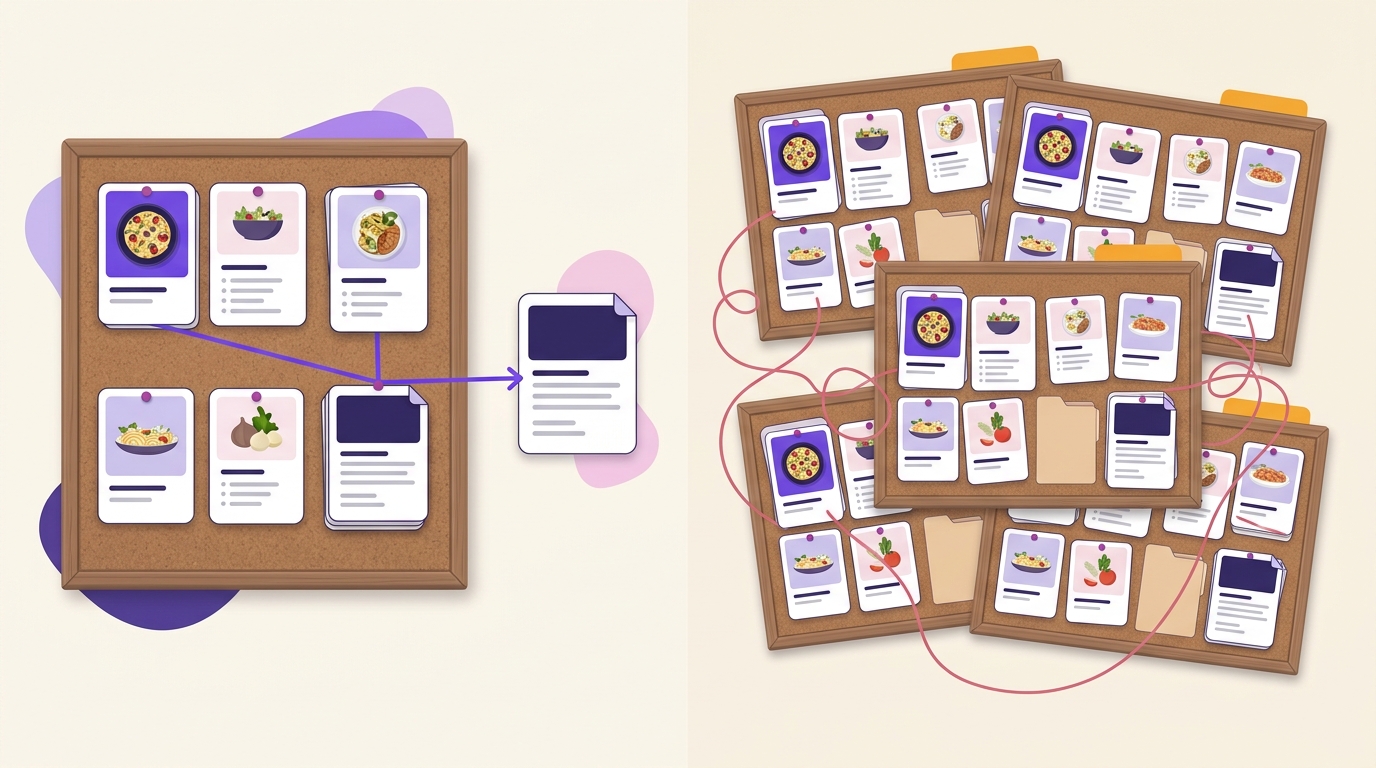
A board should exist because it represents one distinct topic, not because adding another board seems like it might expose more Pins to more people. Place each Pin where someone actually browsing that board would expect both the Pin and the page it links to; a mismatched board makes the Pin feel out of place even when the Pin itself is fine. Overlapping boards with near-identical names don’t create additional topical fit — they just split one topic across several places and make it harder for a browsing visitor, or you, to find anything.
Publish at a pace your creative process can sustain
There’s no fixed number of Pins per week that produces traffic; the real constraint is whether your team can keep producing materially distinct, destination-relevant Pins at whatever pace you choose, and whether you’re comparing results between them. Choose a pace that lets you produce distinct, destination-relevant Pins. Pinterest’s Community Guidelines, accessed August 2026, prohibit unapproved automation and tactics intended to improperly influence distribution, clicks, or other metrics, including inauthentic traffic, bought engagement, and irrelevant-keyword stuffing.
When output starts feeling repetitive, that’s the signal to simplify the workflow — fewer, distinct Pins beat a high-volume queue that tests nothing because every asset looks and links the same.
Measure the traffic funnel, not just engagement
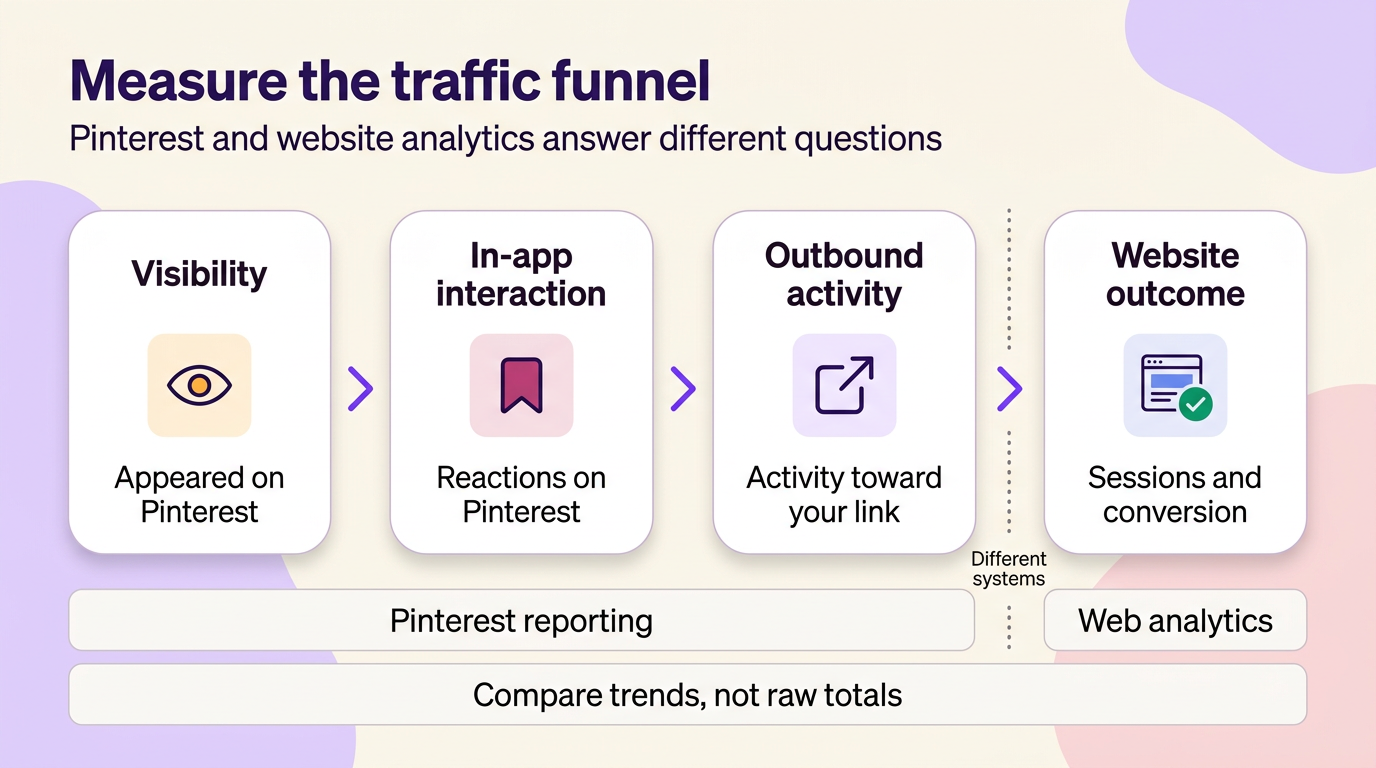
Pinterest activity and website traffic are measured in different systems with different scopes, and treating them as one number is the fastest way to misjudge what’s working. Separate four stages before drawing a conclusion: how visible your Pins are inside Pinterest, how people interact with them on-platform, how much outbound activity Pinterest reports toward your destination, and how many of those clicks became a website session with the conversion action you defined.
| Stage | Measure source | What it represents | Common interpretation error | Next decision |
|---|---|---|---|---|
| Visibility | Pinterest’s own reporting of visibility | How often a Pin appeared to people on Pinterest | Assuming high visibility means strong interest | Check whether in-app interaction is proportionate before changing the Pin |
| In-app interaction | Pinterest’s own reporting of on-platform reactions | Reactions to the Pin inside Pinterest itself | Treating in-app reactions as website visits | If interaction is healthy but clicks are low, revisit the destination promise |
| Outbound activity | Pinterest’s own reporting of clicks toward your link — check your account for the current metric name and definition | Pinterest’s count of activity headed toward your destination | Assuming this figure equals a website session | Compare its trend with your analytics referral count for the same period |
| Website outcome | Your web analytics platform’s referral sessions and your defined conversion event | Actual sessions attributed to Pinterest and whether visitors completed your chosen action | Comparing raw counts across systems as if attribution matched | If sessions arrive without conversions, fix the landing page before publishing more Pins |
Treat Pinterest’s own reporting and your website analytics as two separate systems until you’ve verified how each defines and scopes its numbers; the two are unlikely to match exactly even when both are working correctly, so compare each system’s trend over time rather than forcing one period’s totals to line up.
As an illustrative example only: a boutique publishes a Pin linking to one product page. Pinterest reports 40 outbound clicks that week; the analytics platform logs 25 referral sessions from Pinterest over the same period, and 2 of those complete a purchase. The session-to-purchase rate here is 2 divided by 25, or 8% — a made-up figure used only to show the calculation, not a benchmark. The gap between 40 clicks and 25 sessions illustrates why the two systems’ raw counts shouldn’t be expected to match — a reason to trust each system’s own trend over its absolute number.
When Pinterest activity does not turn into useful traffic
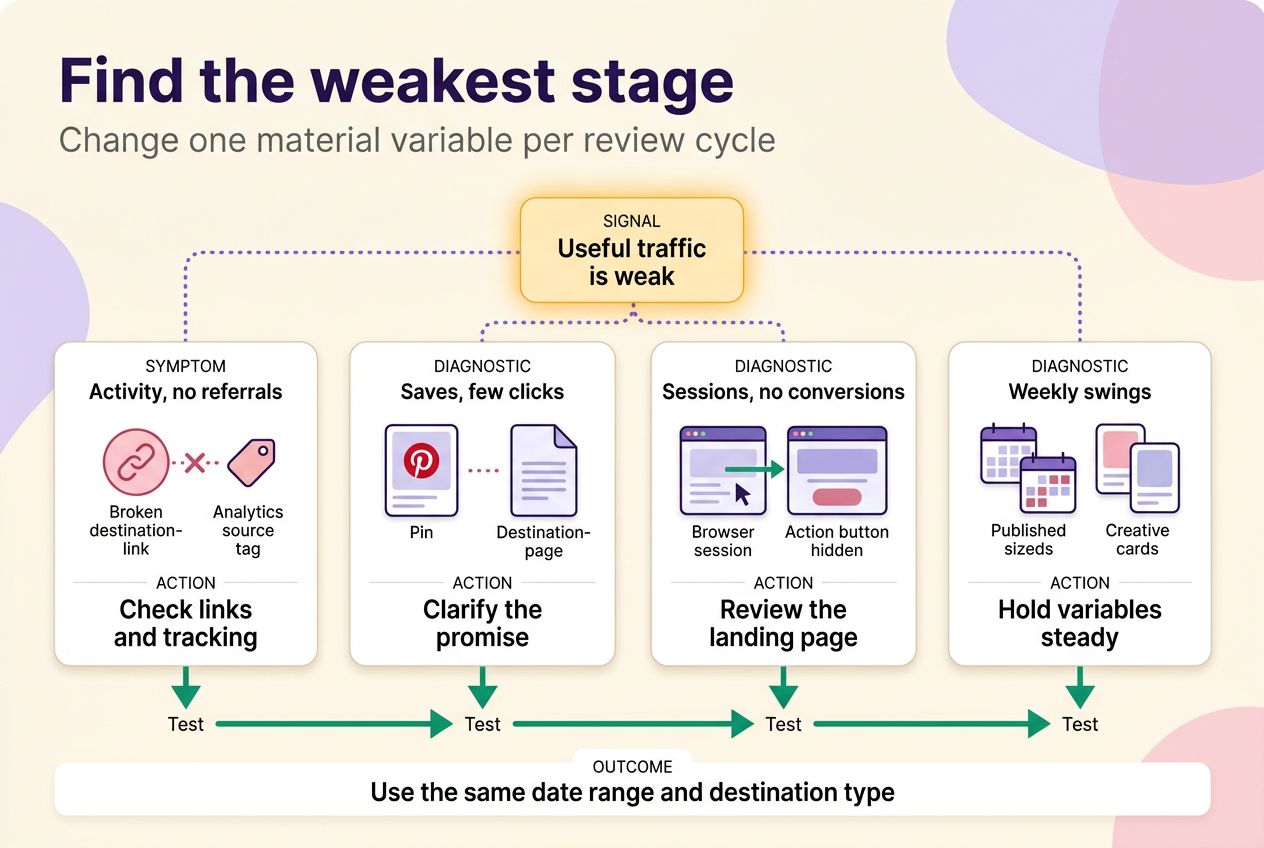
Picture an account with steady impressions and a healthy save rate, but a website report showing almost no Pinterest referral traffic for the month. That gap has more than one possible cause, and diagnosing it means comparing your own records rather than assuming a single explanation.
| Symptom | Plausible explanations | What to compare first | One test to run |
|---|---|---|---|
| Pinterest activity looks healthy but almost no Pinterest referral traffic shows in the website report | Either the destination link or the analytics source/medium setup isn’t registering a Pinterest referral as its own source, or the account genuinely isn’t generating outbound activity yet | Check the destination link and your analytics platform’s source/medium settings before assuming the Pin is at fault | Fix the tracking setup, then re-check the same date range before changing anything creative |
| Impressions or saves look fine, but almost nobody clicks through | The Pin’s promise may not clearly point to the linked page, or the topic may be attracting an audience that isn’t the one the destination serves | Compare this Pin’s click behavior against a similar Pin on a similar destination that performs differently | Test one clearer version of the topic-to-destination promise while holding the destination and board constant |
| Pinterest-reported clicks and analytics sessions roughly match, but the conversion event rarely fires | The Pin may be sending the right visitors to a page that doesn’t convert well, or the conversion event itself may be misconfigured | Confirm the conversion event fires correctly on a known-good referral source before blaming the Pinterest traffic | Review landing-page relevance, load time on mobile, and whether the next action is visible without scrolling |
| Results swing widely between weeks with no clear pattern | Publishing schedule may be inconsistent, or creative may vary too much between batches to compare fairly | Line up each week’s output against what actually published — cadence, topic, and destination — before assuming a metric problem | Simplify production until topic, board, and destination stay steady long enough to test one variable at a time |
In every case, change one material variable per review cycle, using the same date range and destination type each time, so whatever shifts afterward can be traced to something specific rather than assumed.
Check feature status before following older Pinterest advice
A lot of circulating Pinterest advice assumes a feature still works the way it did when it was written. Rich Pins, website save tools or widgets, native scheduling, third-party scheduling tools, collaboration boards, hashtags, and paid campaigns should all be treated as optional and re-checked for current availability and setup before you build a workflow around them — a third-party scheduling queue is not automatically a native control or a guaranteed substitute for manual, policy-compliant publishing.
The same check applies to paid partnerships if brand or affiliate relationships are part of your traffic plan. As of August 2026, Pinterest says that adding a paid partnership to a Pin causes the paid-partnership label to appear automatically when the Pin is published. Pinterest also says a brand’s rejection of that label removes it from the Pin. Pins containing mentions or affiliate links are currently not eligible for promotion specifically as Idea ads with paid partnerships; that restriction does not describe affiliate links generally. Confirm each of these against current documentation before relying on them.
Common mistakes that create Pinterest activity without useful traffic
Optimizing for follower count instead of the outcome you actually chose is the first mistake — followers can grow while referral sessions stay flat. Linking every Pin to a generic homepage instead of the specific matching page is the second, and it quietly destroys your ability to trace which topic or creative worked. Treating boards as a reach shortcut, copying an unverified posting quota, and confusing saves with actual website visits round out the pattern.
Two carry documented risk beyond wasted effort. Pinterest’s guidelines prohibit unapproved automation, buying or selling engagement, irrelevant keyword stuffing, and generating inauthentic traffic. And disclosure isn’t optional when a paid partnership or affiliate relationship is involved: Pinterest says paid partnerships must disclose their commercial nature. In the United States, the FTC says Pins can be endorsements, and influencers with a material connection to a brand must clearly disclose that connection in social-media posts, as detailed in its influencer disclosure guidance.
Choose your first branch and take one practical step
Pick the branch that matches where you actually are, and do only that one thing before adding anything else. No destination or conversion event yet: define both before making another Pin. Destination ready but no matching Pin: create one topic-matched concept and publish it. Pins already live but no way to compare results: set up one measurement view that separates Pinterest’s own numbers from your website’s referral sessions. Publishing has been inconsistent: simplify production until you can hold one variable steady.
Each step is small enough to finish this week, and finishing it is what makes cadence, boards, and funnel review worth doing next. For a broader map of Pinterest topics beyond this workflow, see the Pinterest resource hub.
No method guarantees a specific number of followers, views, or income. Results depend on niche, content quality, and account history.
 120,000+ creators say yes
 Real Active Accounts


 Username Generator
  Hashtag Generator
  Font Generator