
How to Get More Likes on Instagram: A Practical Diagnostic and Action Plan
To get more likes on Instagram, work through the actual constraint instead of trying every tactic at once:
- Confirm your account or post isn’t restricted or hidden
- Separate low reach from a weak like rate
- Sharpen relevance, clarity, and payoff for viewers
- Test distribution that reaches an overlapping audience
- Compare one changed variable against similar past posts
Most advice about Instagram likes skips straight to content tips and ignores a simpler question: did the right people even see the post? A caption rewrite won’t fix a reach problem, and posting more often won’t fix a message that doesn’t land once people do see it. This guide walks through the order that actually matters — checking account and post status, separating reach from response, tightening the message, and testing distribution — before touching format-specific fixes for Reels or a rough way to plan toward a number like 100 likes. Where a claim about Instagram’s policies or measurement appears here, it’s tied to the platform’s own documentation rather than assumption.
On this page
Follow this order to improve Instagram likes
Getting more likes reliably comes down to finding which stage is actually broken before making changes. Work through these in order:
- Confirm status first. Open Account Status to check whether a post was removed, a feature is restricted, or your professional account currently shows as eligible for non-follower recommendations. This takes minutes and tells you whether a documented removal or restriction affects the post before you touch content.
- Separate reach from response. In Insights, compare Accounts reached against likes for the same post. A post can reach fewer accounts than usual yet convert a higher share of them into likes — or the opposite. These are different problems with different fixes.
- Revise the message, not just the polish. If reach is fine but the like rate is weak, the audience saw the post and didn’t act. Fix relevance, clarity, and payoff before touching design.
- Test distribution that reaches people likely to care. Stories, tags, collaborations, and cross-promotion only help when they put content in front of an audience that overlaps with your existing one.
- Compare one changed variable at a time. Publish a comparable post that changes a single element — topic, opening, or format — and compare reach and like rate against a similar recent post, not against your best-ever result.
Skipping to step three before finishing steps one and two is the most common way this process gets wasted: a reach problem dressed up as a content problem will absorb hours of rewriting and still not move.
Check official account and post status before changing your strategy
Account-level status and post-level status answer different questions, and conflating them wastes the diagnostic. Account Status shows removed posts, Stories, or comments; current feature restrictions; and, for professional accounts, whether your content is currently eligible to be recommended to non-followers in Explore, Search, Suggested Accounts, Reels, and Feed Recommendations, as described in Instagram’s recommendation eligibility guidance. It also gives a route to request review of a removal or restriction. Menu names and exact placement for these checks can vary by app version, account type, and region. None of this identifies a ranking factor or explains an isolated dip in likes — it only tells you whether a removal, restriction, or non-follower recommendation-eligibility issue is documented for the account or a specific post on the surfaces Instagram names. If status shows nothing unusual, that only rules out a documented restriction; move on to the next steps rather than assuming the diagnosis is finished.
Low likes or low reach? Start with the difference
Low reach and a weak like rate produce the same symptom — a disappointing number — but call for opposite fixes, so this distinction comes before any content rewrite. Accounts reached is the number of unique accounts that saw the post on screen at least once; for Reels, this differs from views, which can count the same account more than once. Comparing raw like totals across posts hides this difference completely.
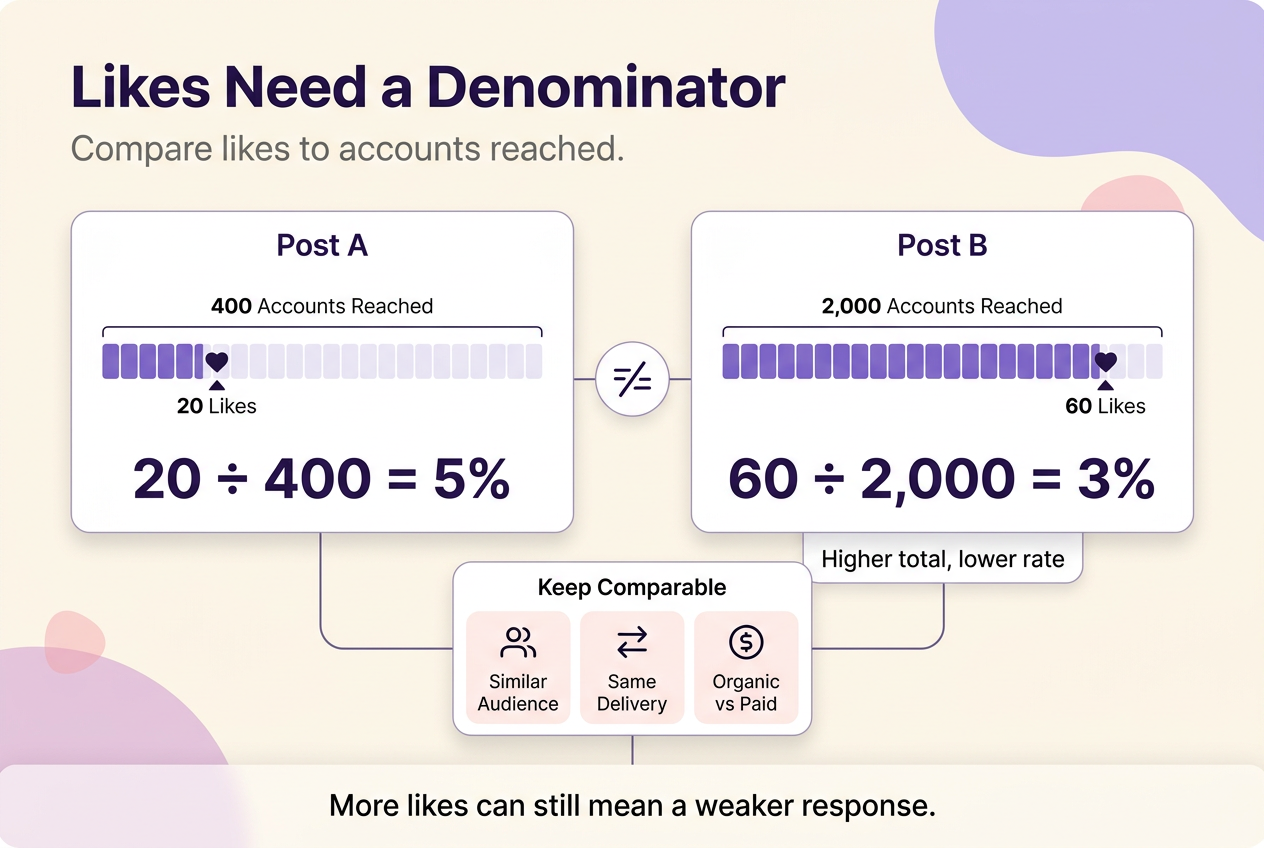
Check reach before revising the content itself. A post that reached 400 accounts and earned 20 likes converted at 5%. A post that reached 2,000 accounts and earned 60 likes converted at 3% — a lower rate despite a higher total. Treating the second post as the stronger one, because its total is bigger, means copying a weaker message simply because more people happened to see it.
As an illustrative example only: a small candle-making account posts a product photo that reaches 900 accounts and earns 40 likes, then posts a short process Reel that reaches 1,800 accounts and earns 90 likes. The Reel leads on both the raw total and this illustrative likes-to-reach rate: about 5% versus 4.4% for the photo. The useful lesson isn’t that one format universally wins — it’s to test which single change, format or topic, moved the result before assuming a pattern from one comparison.
This comparison only holds between posts with a similar audience and delivery type; a boosted post’s reach includes paid distribution, so mixing it into an otherwise organic comparison will distort the ratio in either direction.
| Observed state | Comparison to make | What to review | Next action |
|---|---|---|---|
| Low reach | This post’s reach vs. recent comparable posts | Account Status and recommendation eligibility | Check eligibility and distribution before rewriting content |
| Low likes relative to reach | Likes ÷ accounts reached vs. similar past posts | Relevance, clarity, payoff, format fit | Revise the message and test one change |
| Apparent decline across non-comparable posts | Same format, audience intent, and organic/paid status | Whether the posts being compared are actually alike | Normalize the comparison before concluding anything |
| Hidden or changing visible counts | Same post’s count over several days | Account Status for documented removals or restrictions | Check status first; don’t assume a cause without it |
Make each post easier for the right audience to like
The usual advice — better photos, snappier captions, more hashtags — fails when the real problem is that viewers can’t tell why the post matters to them within the first second or two. Fix relevance and clarity before spending more time on cosmetic polish.
Start with one intended audience per post, not “everyone who follows me.” State or show the payoff immediately: what the viewer gets, learns, or feels by looking at this. Make the opening frame or first line understandable without extra context — if a caption has to explain the image, the image isn’t doing its job. Add specificity or proof where it’s credible: a number, a before/after, a named use case reads as more trustworthy than a general claim. Close with a next action that fits the content, such as an opinion prompt or a save-worthy detail, rather than a demand to like the post before viewing it — the kind of engagement bait Instagram’s own creator guidance flags as content that can be allowed but ineligible for recommendation.
In an April 2024 creator announcement, Instagram also said it planned to stop recommending accounts that repeatedly post other users’ content without creating or meaningfully adding to it — cited at 10 or more times in 30 days — alongside other examples of allowed-but-not-recommended content, such as low-quality repurposed posts. Treat that as a reason to keep an original contribution visible in repurposed content, not as a fixed rule to test against, since Instagram framed it as a rollout rather than a settled enforcement threshold.
Choose the format that carries the message best
Pick the format by the job the message needs to do, then measure it against posts doing the same job — not against a different format’s numbers. Use a single feed post when the message is one idea or proof point that doesn’t need sequence. Use a carousel when the value depends on comparison or a build-up across several cards, since saves matter there in a way a single image can’t show. Use a Reel when motion or a demonstration makes the payoff clearer than a still image could. Use Stories for timely, relationship-building content with people who already follow you, where a quick reply does more work than a polished feed post would.
A format looks weak when it’s judged against the wrong yardstick: a Reel and a carousel describe different viewer behaviors, and treating a lower like count on a carousel as a Reel-style failure leads to abandoning a format that was never trying to win on likes in the first place.
Test distribution choices that match the audience
Distribution only helps when it puts a post in front of accounts likely to actually respond, so start with overlap, not activity for its own sake. Share relevant posts to Stories where a warm audience already engages. Reply to comments and DMs as real conversations rather than scripted replies. Use Instagram’s native collaboration tools appropriately: a tagged Collab post for genuinely co-authored content, and a business-partner tag with a properly disclosed “Paid partnership with” label specifically when a brand has compensated you — these are the tagging mechanisms Meta requires before that content can be used in partnership ads or boosted on a partner’s behalf. Reuse customer content only with explicit permission; a tag is not a license. Cross-promote only into audiences with a genuine reason to care about the post.
Keep paid delivery separate in your thinking from organic response. Boosting a post or running it as a partnership ad changes how it was distributed, so its reach and like numbers describe paid performance, not what the same content would have done unpaid. Meta’s documentation notes that partnership ads run on public content from professional accounts, that creators need a Business or Creator account, and that at least one partner account must be at least 30 days old — useful to know if a brand asks you to tag them for a campaign, but not something that changes how an unpaid post performs on its own.
These channels only add value when the destination audience actually overlaps with people who don’t already follow you — check for that overlap before assuming any given channel will extend reach.
Use account evidence for posting time and hashtags
The common mistake is treating a generic “best time to post” chart as more reliable than your own account. Posting time is worth adjusting only after comparing several of your own comparable posts against each other — same format, same rough topic, different times — because audience activity varies by account and niche in ways a general chart can’t capture. Hashtags work the same way: use them only when they accurately describe the post or its context, not as a volume tactic. Don’t change hashtags, timing, and topic in the same test. If three variables move together, a strong or weak result can’t be attributed to any one of them, and the lesson you take from it will be wrong.
For Reels, improve the opening-to-payoff match
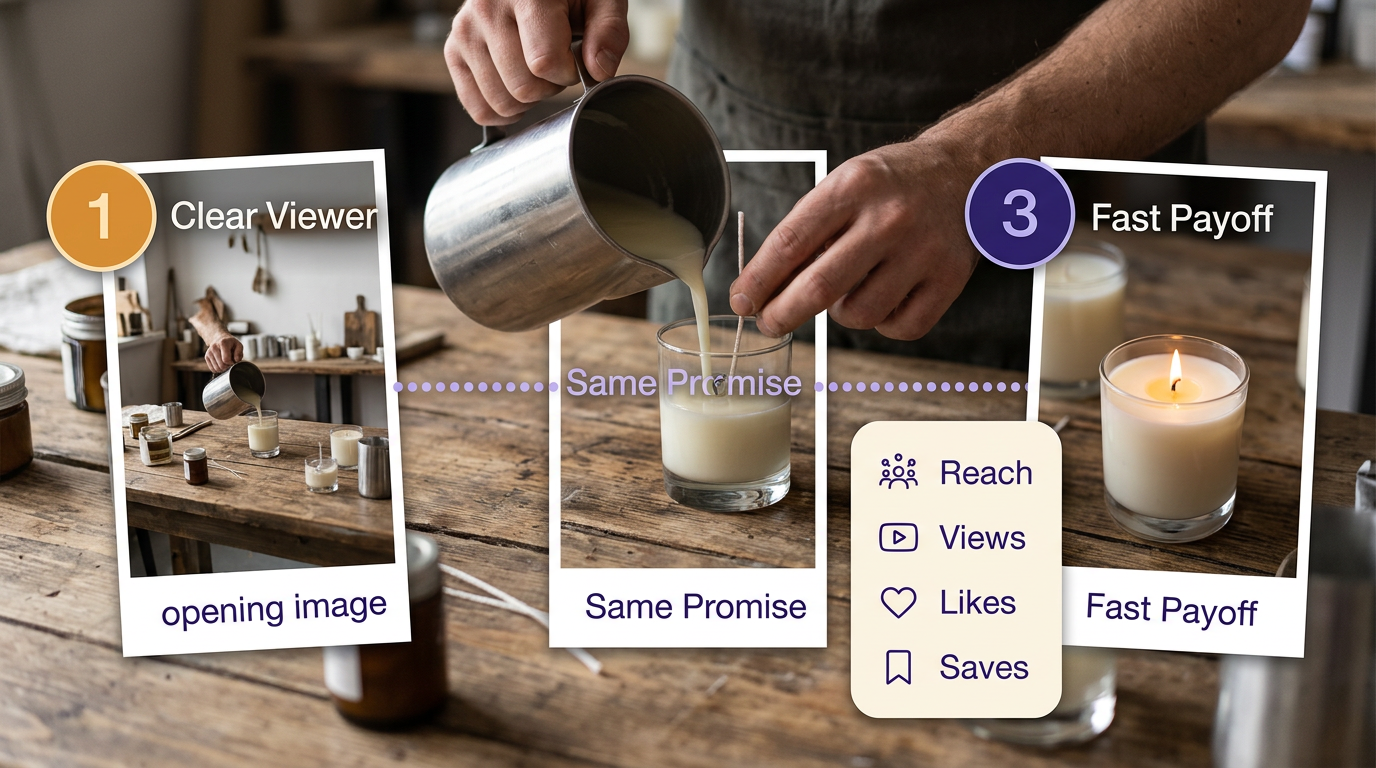
Shortening a Reel or chasing a trending sound fails when the actual problem is a mismatch between what the opening promises and what the Reel delivers. A strong hook followed by a weak or delayed payoff attracts views without earning the like.
Make the intended viewer identifiable within the first frame or line. Keep the value promised in that opening consistent through the middle of the clip — don’t pivot the topic halfway through to keep attention. Deliver the payoff without padding once you’ve set it up. Then read the result alongside more than one metric: Reels views can count repeat plays from the same account, while Accounts reached counts each account once regardless of replays — a Reel with high views but flat reach may simply be getting replayed by the same audience rather than reaching new accounts, so compare both measures rather than treating views as unique discovery. Check that alongside saves, shares, and likes rather than views alone.
Compare that pattern against your own account’s recent Reels rather than a universal benchmark — Instagram’s Insights documentation doesn’t publish a fixed retention or replay target to hit. A stronger like and save pattern relative to reach on a given Reel is worth testing for; it’s a signal to compare against your own baseline, not proof on its own that the Reel worked.
Plan for 100 likes using your own baseline
There’s no fixed way to guarantee 100 likes, but you can estimate the reach it will realistically take using your own recent posts. Divide likes by accounts reached across five or ten comparable posts to get a rough likes-to-reach rate, then divide your target by that rate to estimate the reach you’d need.
As an illustrative example only: if your last ten comparable posts averaged 25 likes for every 500 accounts reached, that’s a 5% likes-to-reach rate (25 ÷ 500). To reach 100 likes at that same rate, you’d need to reach roughly 2,000 accounts (100 ÷ 0.05). If your typical reach per post is closer to 800, hitting 100 likes means either raising the rate — through a clearer message or better format fit — or extending reach through the distribution and eligibility checks earlier in this guide, not both at once.
Use your own organic baseline for this, not a follower count or an outlier post; one unusually strong or weak result will distort the estimate more than it informs it.
Hidden or disappearing likes are different issues
A creator who opens a post and sees a lower like count than expected is usually facing one of two different situations, not one bug. First, check whether the post or account carries a documented removal or feature restriction — Account Status will show this directly. Second, if status shows nothing unusual, treat the discrepancy as unexplained rather than assuming a cause: Instagram’s published documentation doesn’t establish a single, universal way to reveal a hidden like count or to determine why a specific count changed. Compare the same post’s number over a few days before concluding anything, and rely on Account Status for whatever is actually documented there — don’t fill the gap with a guess about settings, visibility, or timing that isn’t confirmed.
Keep like growth safe, permissioned, and measurable
The mistake worth naming directly: treating purchased likes, bots, follow/unfollow schemes, or engagement pods as a shortcut past the diagnostic work above. These methods don’t fix low reach or a weak message — they obscure the number that would otherwise tell you which one you have, and they replace real audience signal with distorted, unreliable data you can’t actually act on.
Native tools are a different category from third-party automation: Instagram’s own visibility and privacy settings let you control who sees your posts, comments, and follows. If a brand relationship is involved, use Instagram’s business-partner tagging so the arrangement is disclosed on the platform — and separately confirm that disclosure meets the FTC’s requirement that a material connection a viewer wouldn’t otherwise expect be stated clearly and conspicuously, since the FTC has said a platform’s built-in label isn’t automatically sufficient on its own.
Run one comparable test, then choose the next branch
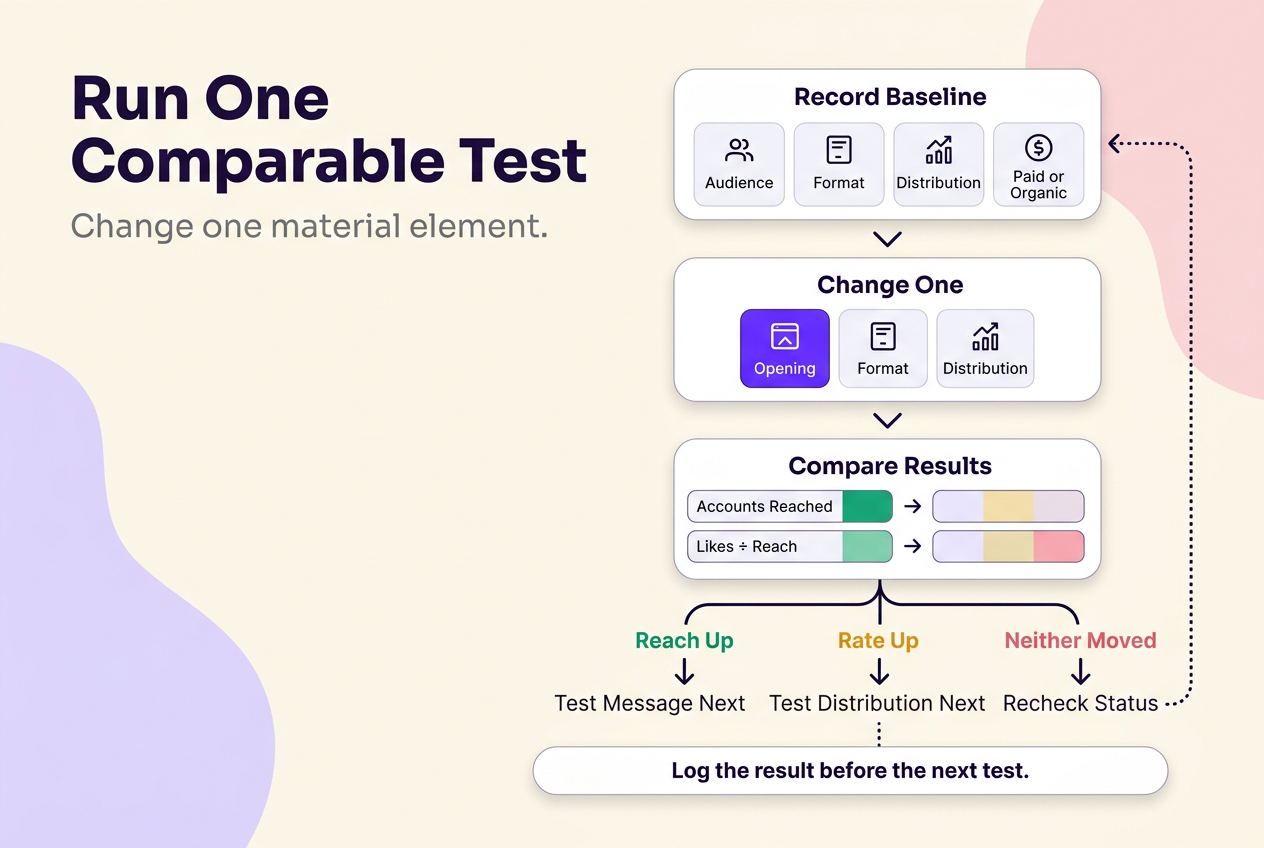
Once you’ve located the likely constraint, the next step is a small, deliberate test rather than a wave of new posts. Before publishing, record the audience you’re targeting, the format, the distribution activity you’re using, whether any paid delivery is involved, and what you expect to see change. Change exactly one material element in the next comparable post — the opening line, the format, or the distribution step — and leave everything else close to your recent baseline.
After it’s live, compare Accounts reached and likes-to-reach against a similar recent post, not against your best result ever. Three patterns are possible, and each points toward a next hypothesis rather than a proven cause:
- Reach improved but the like rate didn’t — that points toward the distribution or eligibility change as the more promising lever; test the message next.
- The like rate improved but reach didn’t — that points toward the content change as the more promising lever; test distribution next to extend it.
- Neither moved — recheck Account Status and recommendation eligibility before concluding the content itself failed; a documented restriction can look identical to a weak post.
Log the result before running the next test. Without that record, a topic change, a format change, and a distribution change made in the same week become indistinguishable, and a win or a loss teaches you nothing you can repeat.
This diagnostic sequence covers the recurring decisions in single-post growth. For broader account-level strategy — posting cadence, content pillars, and audience-building beyond any one post — the Instagram Growth hub covers that ground.
Platform policies, eligibility criteria, and disclosure requirements referenced in this guide can change; confirm current details in Instagram’s Help Center and current FTC guidance before making compliance decisions.
No method guarantees a specific number of followers, views, or income. Results depend on niche, content quality, and account history.
 120,000+ creators say yes
 Real Active Accounts


 Username Generator
  Hashtag Generator
  Font Generator