Best Time to Post on TikTok: A US Starter Schedule and Testing Method
TikTok Studio’s viewer-activity times show your audience’s habits and help identify test windows. Match the posting schedule to your audience’s clock, then use comparable-post testing to confirm which time slot performs best. Start with a small spread of morning, midday, and evening slots when no post history exists.
No single best time to post on TikTok works for every account; the real answer comes from your own audience and content.
- TikTok Studio’s viewer-activity times show your audience’s habits.
- Match the schedule to your audience’s clock, not yours.
- Comparable-post testing confirms which time slot performs best.
- No published dataset supports one universal posting hour.
If you searched for a fixed hour to plug into your calendar, the honest starting point is that no verified, US-specific benchmark is strong enough to print as a fixed schedule. That’s not a dodge — it’s the difference between advice that survives contact with your own account and a number copied from a chart nobody can trace. This guide walks through the three things that actually decide when your videos should go up: what TikTok’s own analytics tell you about your audience, how your audience’s location and your content type should set the clock, and how a small comparable-post test turns a guess into a decision. It also covers how often to post, what to do when views stay flat, and where Creator Rewards and LIVE eligibility fit in, since none of those depend on picking the “right” hour.
What Is the Best Time to Post on TikTok?
Direct answer: TikTok hasn’t published a universal best time to post, and no transparent, US-specific benchmark clears the verification standard — so no fixed hour appears below as a promise. What you get instead is a three-part answer that stacks in order: a verified starter hypothesis where one exists, your own audience-activity data from TikTok Studio as the candidate list, and comparable-post performance as the tiebreaker that actually decides your schedule. If no benchmark clears that bar, start straight from your audience’s activity data and a spread of test slots — waiting for a universal number that doesn’t exist isn’t a plan.
Treat any fixed schedule you see elsewhere with some skepticism. A benchmark is only useful if its market, sample, time zone, and outcome metric match your situation, and most published tables don’t disclose enough of that to check.
Use a Benchmark as a Starting Hypothesis
Different publishers routinely disagree about which hour performs best on TikTok, and the disagreement is rarely a hidden platform rule — it’s almost always a difference in market, sample, content mix, collection period, or the outcome metric each table measures. No transparent third-party posting-time table establishes a fixed schedule from a US-specific, campaign-neutral sample, which is why none appears here as a fixed schedule. If your account has no post history yet, the practical substitute is a small spread of test windows across the day — one morning, one midday, one evening slot — rather than a search for someone else’s best hour. Once you have comparable posts sitting in each window, your own audience-activity data becomes the far more reliable input, and that’s what the next section covers.
Use TikTok Studio to Select Test Windows
TikTok Studio is the current home for creator analytics, and it’s the fastest way to build a defensible shortlist of test windows instead of guessing. As of August 2026, it provides account-level and video-level analytics, including audience demographics and viewer activity times — a signal of when your audience has been active on the app.
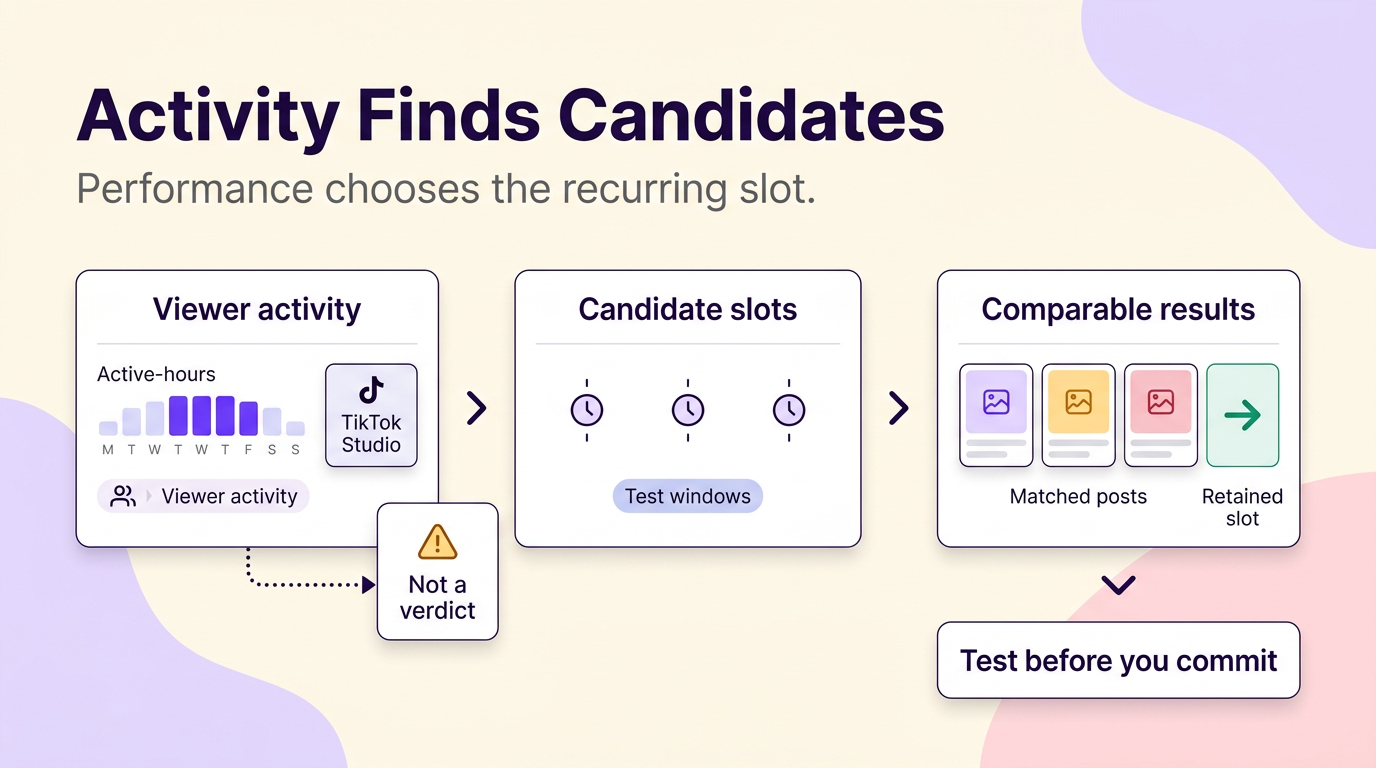
That activity-times signal is the single most useful input for choosing your first test slots, because it reflects your account’s own audience rather than a published average. Treat it as a shortlist generator, not a verdict: TikTok doesn’t publish the underlying time zone, lookback window, or aggregation method behind that signal, so a slot that looks strong there still has to earn its place through the post-performance comparison covered later in this guide.
This kind of reporting is documented for creator and business accounts; the testing steps in this guide assume you’re using one of those account types. TikTok’s creator tools documentation also describes analytics access through the desktop Upload interface, where you can review total views, net followers, likes, and insights on individual posts — useful if you’d rather plan from a larger screen than your phone. Menu names, tab order, and exact availability inside TikTok Studio can shift by app version, account type, and region, so treat the section names here as a starting point for your own search rather than a fixed map.
Activity Finds Candidates; Performance Chooses the Schedule
Audience activity tells you when people are around; it doesn’t tell you whether a post published then actually performed. That distinction decides the whole test: activity data supplies candidates, and only a run of comparable posts published in those candidate windows decides whether a slot stays, rotates out, or gets replaced. Keep the comparison honest by holding content constant — put educational posts up against other educational posts, and offers up against other offers, inside the same content pillar, format, and audience intent. Stack a promotional offer against a tutorial in the same time slot and a weak result will look like a timing problem when the real variable was viewer intent, not the clock.
Set the Schedule by Your Audience’s Clock
A bakery in Austin posting store-hours promos, a national skincare brand shipping across the US, and a creator whose comments read like a world map aren’t solving the same scheduling problem, even though all three are chasing the same posting-time question. For a local business, the audience that matters is the one that can walk through the door or call today, so the schedule should run on that customer’s local clock, not the creator’s habit or the brand’s headquarters time zone. For a business or creator with a concentrated national US audience, the viewer-activity signal in TikTok Studio becomes the anchor, since it already reflects where most of that audience actually is. For a dispersed, multi-region audience, no single clock covers everyone — the useful move is testing the overlap windows where the largest reachable segments are awake, then letting comparable-post performance settle which overlap window earns the recurring slot. One case deserves its own rule: promoted LIVE activity should run on the intended attendee’s clock, not the creator’s, since a LIVE session with nobody watching live defeats the point of going live.
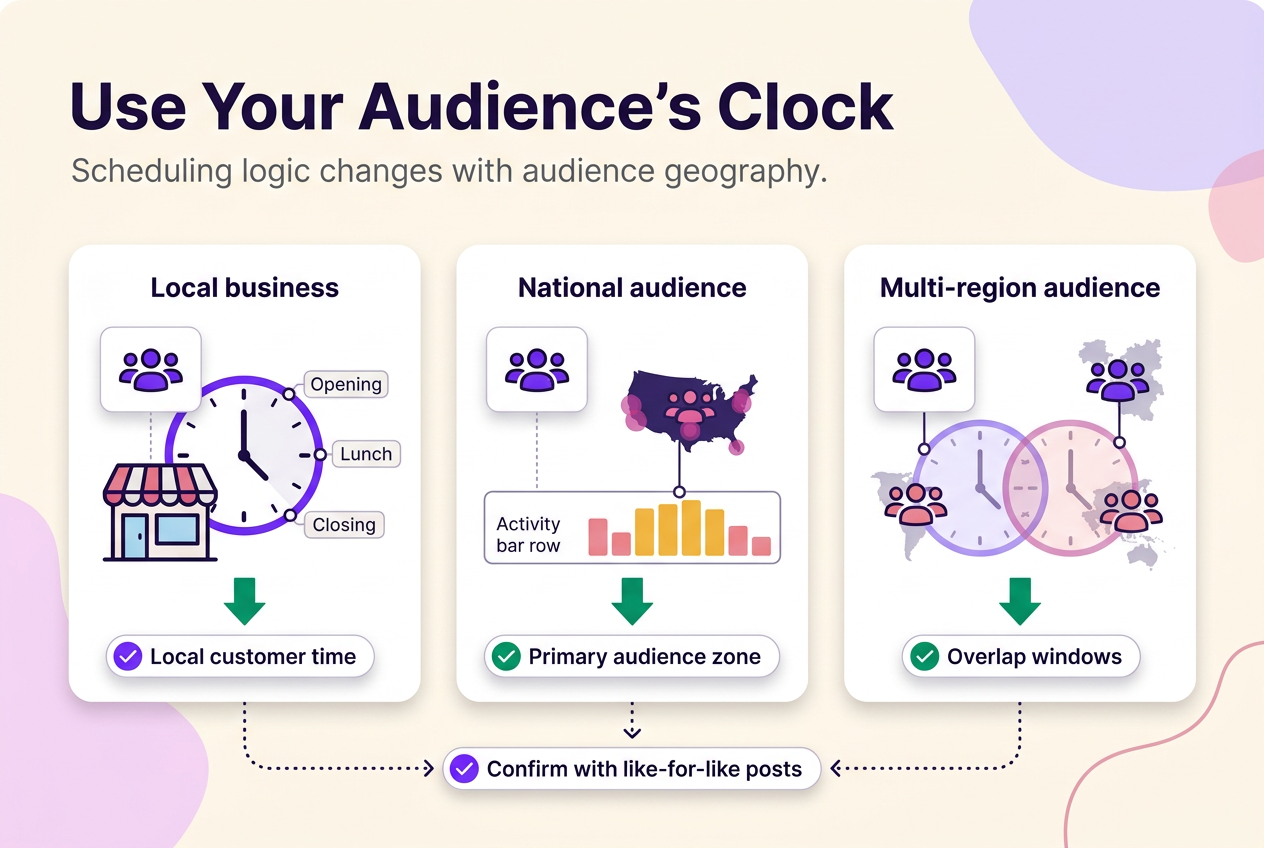
| Audience type | Scheduling clock to use | First test-window source | Next action |
|---|---|---|---|
| Local business (walk-in or local service) | Local customer time zone | Known store hours and peak periods | Test slots around opening, lunch, and closing; confirm with post performance |
| Concentrated national US audience | Primary audience time zone | TikTok Studio viewer activity times | Rotate two to three candidate slots and compare like-for-like results |
| Dispersed, multi-region audience | Overlap window across major audience regions | Viewer activity times and the account’s known audience geography | Test overlap windows only; no single hour reaches everyone at once |
Run a Posting-Time Test That Can Produce a Schedule
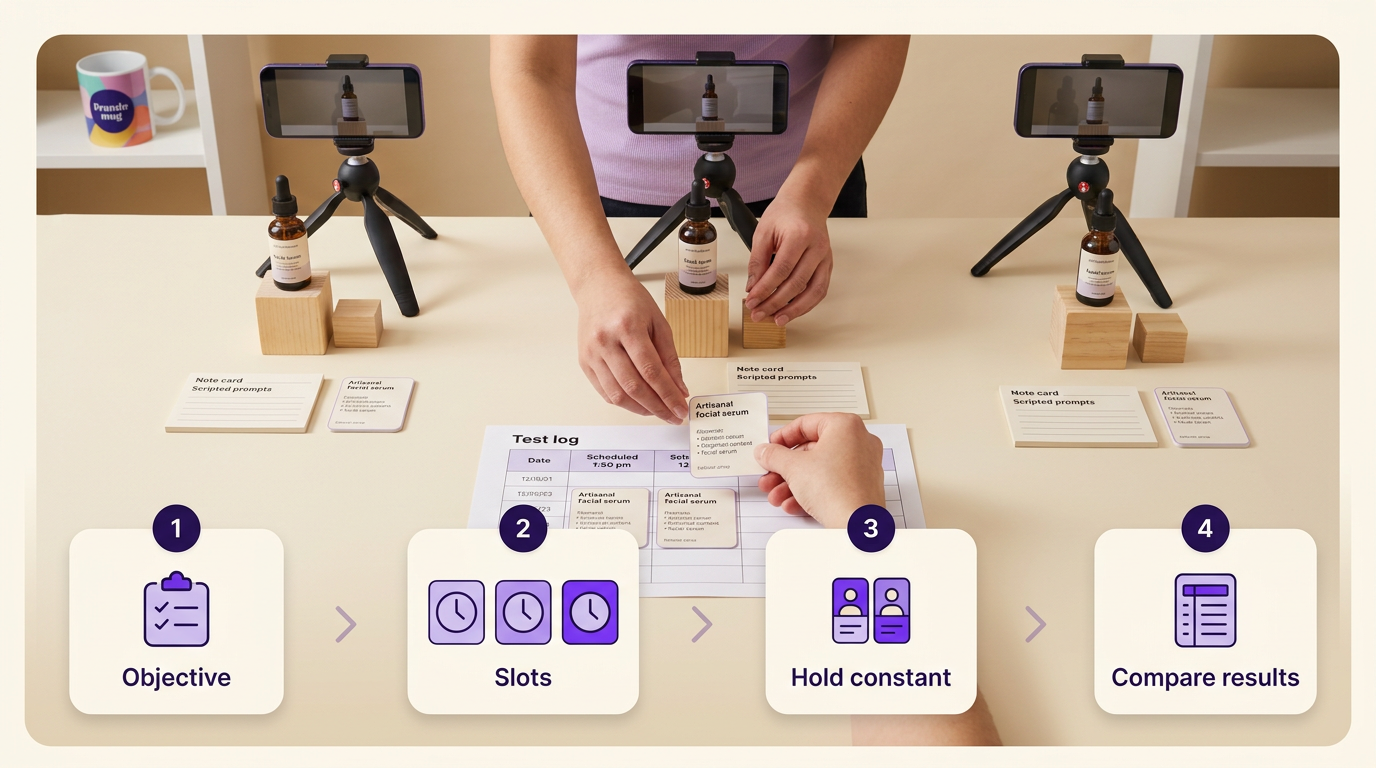
A posting-time test that actually produces a usable schedule follows a fixed order: pick one objective and one comparison metric, pick a small set of slots, hold the content constant across those slots, log the same fields every time, and compare results over a stable period before you commit to anything.
- Choose one objective and the metric that matches it — the next section covers how to pick it.
- Pick a small, testable set of three or four slots, informed by your audience-activity check and your audience-clock decision.
- Rotate the same content pillar and format across every slot in the test. Don’t send tutorials to one slot and offers to another — that tests two variables at once.
- Log identical fields for each post: objective, metric, content pillar, format, hook promise, audience time zone, test slot, whether the post is organic or paid, the result, and the comparison period.
- Let enough comparable posts accumulate in each slot before judging it. One outlier isn’t a pattern.
- Retain, rotate, or replace each slot based on a repeated pattern across multiple posts, not a single video.
TikTok’s native scheduling feature lets you queue a video to publish later, which makes running this kind of test far less effort than manually posting live in every slot. A slot that wins this comparison tells you it worked for this content and this audience in this window — it doesn’t prove TikTok’s recommendation system treats that hour differently for anyone else.
Choose the Metric Before You Compare Slots
Not every slot comparison should be judged by the same number, and the metric should come from what TikTok actually shows you, not an assumed formula. If the objective is awareness, total views — the metric TikTok’s own analytics label and report — is the right comparator. If the objective is consideration, look at the interaction counts TikTok does report, such as likes, alongside whatever comments, shares, and saves your account can see, to check whether people engaged rather than scrolled past. If the objective is a business outcome — a local visit, a lead, a sale, or a LIVE attendee — the closest metric you can actually track beats views every time, because a slot can win on views and still lose on the outcome that pays the bills.
Where a rate is useful, define it yourself before comparing anything — TikTok doesn’t publish an official “engagement rate” formula, so any rate you use is an editorial calculation, not a platform metric. As an illustrative example only: a post with 10,000 views and 400 combined likes, comments, shares, and saves works out to 400 ÷ 10,000, or 4% of views; a comparable post with 6,000 views and 300 of the same interactions works out to 5%. Neither figure is a benchmark, and neither proves which post held viewers’ attention longer — the calculation only shows which post drew proportionally more interactions relative to its own view count.
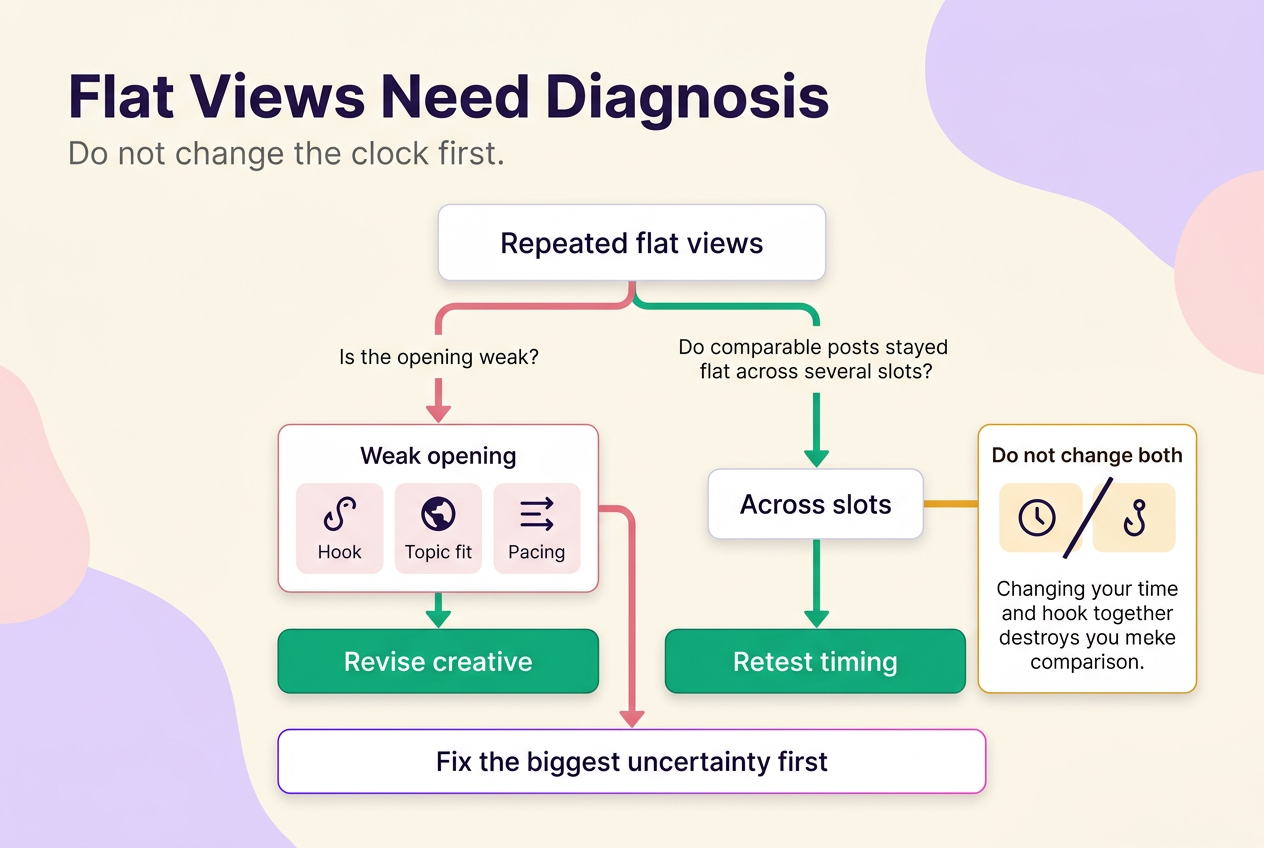
Weak Views Do Not Automatically Mean the Posting Time Was Wrong
The mistake is assuming a flat view count proves the hour is wrong. One illustrative example makes the point concrete: a small skincare business posts the same style of 45-second tutorial in the same 7 p.m. local slot for three straight weeks, and views hold flat in the 600-900 range each time. Before touching the schedule again, the useful move is a creative-fit review, not a fourth timing change — does the opening clearly state what the viewer will learn or see in the first few seconds, does the topic match a problem the account’s own audience actually has, does the pacing match the format, and does the account or post show any status or eligibility notice inside TikTok’s own settings that’s worth reviewing before you touch the schedule again.
Changing the hour and the hook on every attempt removes the one thing a test needs — a fixed variable to compare against. If the creative-fit review turns up nothing and flat results hold across several comparable posts in different slots, timing becomes the more credible lever worth re-testing.
Build a Sustainable Cadence and Content Mix
The right posting frequency is the highest cadence you can sustain while still producing enough comparable posts in each test slot to judge it fairly — not a fixed number pulled from somebody else’s calendar. How often to post on TikTok is a capacity question before it’s a strategy question.
The workable priority order is straightforward: consistency you can sustain for months beats a high-volume week you can’t repeat; a compact content mix beats constant novelty for its own sake; and a calendar that leaves room for a timely offer or a local event beats one that’s fully pre-batched weeks in advance. A useful content mix for most small accounts covers four purposes — evergreen education, proof or demonstration, timely offers, and community or local relevance — repeated in rotation rather than reinvented every week.
Batch drafting several videos at once is a real time-saver, but only if the calendar keeps open slots for seasonal moments, local events, timely offers, and comment-led follow-ups. A fully pre-batched month can’t respond to a trending question in your comments or a local event worth referencing, and reserving that flexibility is worth the calendar space.
Use Content Pillars to Fill the Schedule
Picture a four-row weekly layout instead of a wall of times: one row for evergreen education, one for proof or demonstration, one for a timely offer, and one for community or local relevance. Next to each entry, a working TikTok posting schedule template should record the business objective, content pillar, format, hook promise, audience time zone, the test slot itself, the metric you’re judging it by, the result, and the next scheduling decision. A calendar with times but no content purpose can’t tell you whether a slot supported what you were actually trying to achieve; one built around content pillars can.
Creator Rewards and LIVE Have Separate Eligibility Checks
Posting time and posting frequency have nothing to do with whether you qualify for TikTok’s Creator Rewards Program or TikTok LIVE — those run on their own eligibility rules, not on the strength of your schedule. To join the Creator Rewards Program, TikTok currently requires creators to be in an eligible country, use a personal account in good standing with authentic account information, be at least 18, have at least 10,000 followers, and have logged at least 100,000 video views in the last 30 days. Once enrolled, individual videos must meet further conditions: they need to be original, meet TikTok’s quality bar, run at least one minute, be uploaded after joining the program, and reach at least 1,000 qualified For You feed views before they earn anything. Every eligible video also has to comply with Community Guidelines and Terms of Service. TikTok LIVE sits on a separate bar entirely: creators must be at least 18, meet TikTok’s follower requirement for LIVE, and have access to LIVE. An exact LIVE follower number is not stated here because the TikTok documentation cited here does not establish one — check TikTok’s current LIVE requirements directly before planning around a threshold.
These thresholds apply only to Creator Rewards enrollment and reward eligibility, not to ordinary organic reach, Business accounts, or other monetization tools, and TikTok can adjust them — confirm the current numbers on TikTok’s own pages before you plan around them.
Choose the Next Step for Your TikTok Schedule
What you do next depends on what you already have, not on a generic checklist. If your account already has comparable post history, pull TikTok Studio’s post-performance data and review whatever test log you’re keeping before changing anything. If your audience is concentrated in an identifiable location, convert your schedule to that audience’s clock first and skip straight to testing within it. If your results have been mixed or inconsistent across posts, run a small like-for-like test before you touch the schedule at all. If your videos show repeated weak opening seconds regardless of the slot, revise the hook and topic promise before blaming the clock again. If your account is brand new with no post history yet, start with a small spread of test slots and begin logging results — waiting for a dataset that doesn’t exist yet isn’t a plan.
For broader platform strategy beyond posting schedules, the TikTok section hub covers the rest of what goes into growing an account on the platform.
No method guarantees a specific number of followers, views, or income. Results depend on niche, content quality, and account history.
 120,000+ creators say yes
 Real Active Accounts


 Username Generator
  Hashtag Generator
  Font Generator