
What Does Restrict Mean on Instagram?
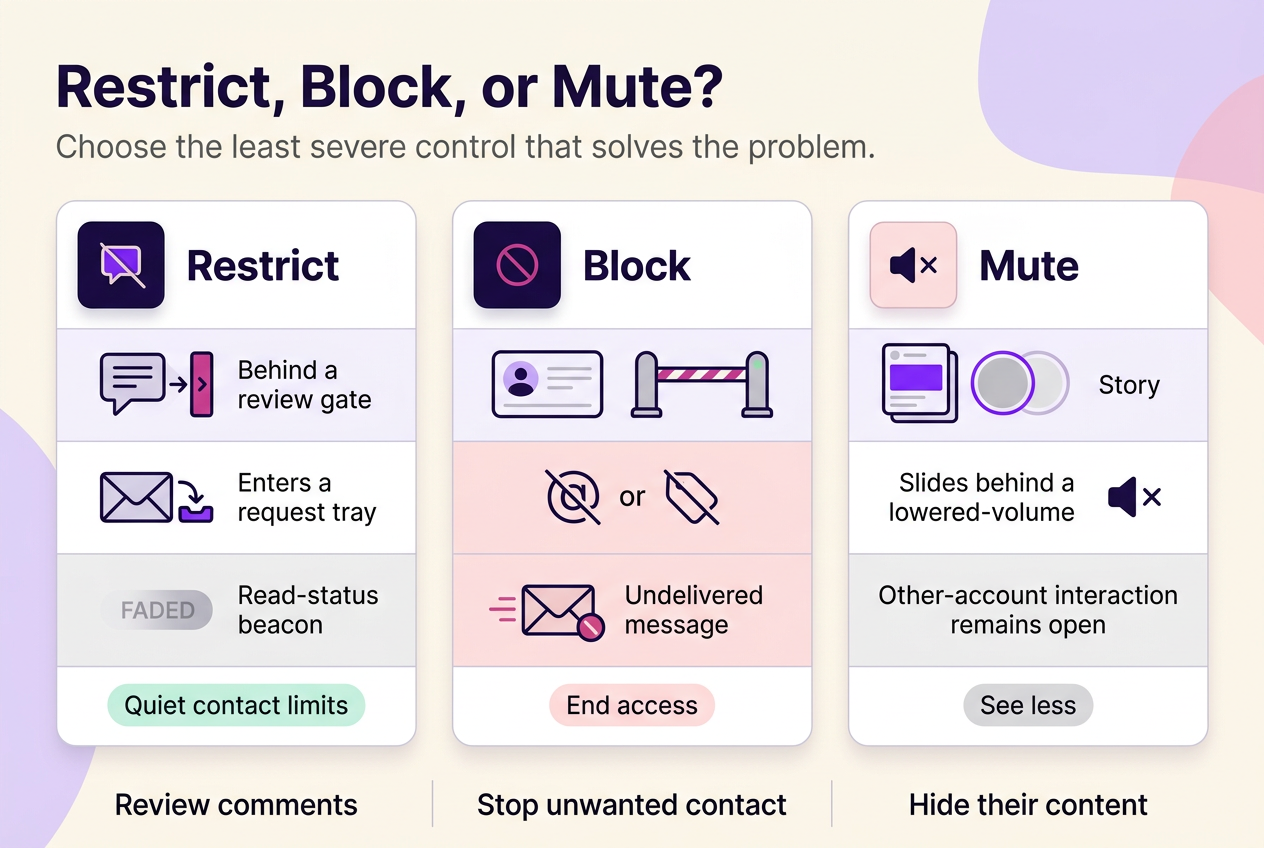
Restrict on Instagram means limiting how one specific account can interact with you, without blocking or muting them outright. Restricting someone hides your read receipts and active status from that person, keeps their new comments visible only to them until you act, and moves their messages into message requests instead of your main inbox.
Most people reach for Restrict after a comment thread turns awkward or a conversation with someone they can’t fully cut off starts feeling one-sided. The feature sits between doing nothing and blocking outright, and understanding exactly where that line falls — what it changes about comments, messages and status indicators, and what it leaves untouched — is what actually determines whether it solves the problem in front of you. This piece walks through those mechanics, sets Restrict next to Block and Mute so the choice between them is concrete rather than guesswork, and addresses the question almost everyone asks next: whether the other person can tell.
On this page
Restrict quietly limits how one account interacts with you
Restricting someone on Instagram changes how that one account can interact with you, without blocking them outright. Their new comments on your posts stay visible only to them until you decide otherwise, their messages move out of your main inbox, and they lose the ability to see when you’re online or whether you’ve read what they sent, as Instagram’s Restrict documentation confirms. That documentation covers comments, message routing and read/activity indicators — it doesn’t spell out a broader content-visibility outcome, so don’t treat this feature as a guarantee about your posts, Stories, profile or follower list.
Comments can be reviewed without immediately making them public
The distinction that matters here is who sees what, and when. The moment a restricted account comments on one of your posts, that comment is visible only to the person who wrote it — not to your followers, not to other commenters, and not even to you until you go looking for it. From there, you can reveal the comment so everyone sees it, approve it quietly, delete it, or simply leave it in that limited state indefinitely. You also stop getting notified about that person’s future comments, so nothing forces you to act on one you’d rather ignore.
DMs are separated from normal conversations
Picture someone you’ve restricted sending you a message the next day. It doesn’t vanish and it isn’t blocked outright — on the Android and iPhone app, which is what Instagram’s documentation covers, it routes into message requests instead of your primary inbox, and any existing conversation you already had with that person moves there too. Labels and inbox placement can vary by version or surface. You can open and read the message without the sender seeing that it’s been read, then decide whether to delete it, block the person, or reverse the restriction. Group chats are the one documented exception: if a restricted person is in a shared group, you get a warning and can choose to stay in that thread or leave it.
Read and activity signals are hidden from the restricted account
Restrict specifically blocks two signals for the other person: they can no longer see when you’re active on Instagram, and they can’t tell whether you’ve read the messages they’ve sent you. This is narrower than it might sound — it’s a Restrict-specific effect between your two accounts, not a global switch for your Activity Status or read receipts with everyone else. Your other conversations keep whatever read-receipt and activity behavior they already had.
What Restrict does not change
The mistake worth avoiding is treating Restrict as a content-hiding tool. It isn’t one. Instagram’s documentation limits Restrict’s confirmed effect to comments, direct messages and the read/activity signals covered above; it doesn’t document a change to your posts, Stories, profile visibility or follower list, so don’t rely on Restrict to control who sees your content — use Instagram’s dedicated privacy and follower controls for that.
Restrict vs. Block vs. Mute: choose the control that matches the problem
These three controls solve different problems, and mixing them up usually means picking either too weak or too strong a response. Restrict limits specific interactions — comments, messages, read and activity status — a narrower, more targeted scope than Block’s documented access controls. Block removes access outright: Instagram documents that a blocked person can’t find your profile, posts or Story, can’t mention or tag you, and can’t send you new direct messages, per Instagram’s Block documentation. Existing message threads aren’t deleted by either action, and group-chat memberships follow their own rules. Mute sits apart from both: it changes what appears in your own Feed, Stories or incoming message notifications from that account — Instagram’s Mute documentation doesn’t describe it as limiting what the other person can see, comment on, or send you. Block and Mute both apply without notifying the other account, per Instagram’s documentation, though losing profile access after a block is often noticeable on its own even without one.
| What changes | Restrict | Block | Mute |
|---|---|---|---|
| Their access to your profile, posts and Story | Undocumented — Instagram’s Restrict guidance doesn’t address this | Removed — they can’t find your profile, posts or Story | Outside Mute’s scope — Mute only changes what appears in your own Feed and Stories |
| Their comments on your posts | New comments visible only to them until you review, approve, delete or ignore | Can’t comment because they can’t reach your posts | Not addressed — Mute doesn’t limit their ability to comment |
| Direct messages | Routed to message requests (documented for Android/iPhone); you can read without them seeing you’ve read it | New messages can’t be delivered to you | You can mute their messages so they stop notifying you; Instagram doesn’t document this as preventing them from sending |
| Your read receipts and active status, visible to them | Hidden — they can’t see when you’re active or whether you’ve read their messages | Not applicable — their access is removed | Not addressed by Mute |
| Direct notification when you apply it | Not documented in Instagram’s Restrict guidance | None sent, per Instagram | None sent, per Instagram |
| Best fit | Reducing contact with someone you still interact with, without an obvious signal | Ending contact with an abusive, threatening or unwanted account | Seeing less from an account you don’t want to unfollow or confront |
Can you tell if someone restricted you?
No — Instagram doesn’t give you a way to confirm that another account has restricted you. What you might notice instead are a handful of ambiguous signals, and none of them is unique to Restrict.
- A comment you left seems to go unseen — this isn’t proof; ordinary moderation or a simple delay can look the same.
- A message sits unanswered longer than usual — normal inactivity explains this just as easily.
- You can no longer tell if they’re active — activity visibility depends on more than one setting, not only Restrict.
- Their replies change in tone or frequency — this has plenty of everyday explanations that have nothing to do with Restrict.
None of these clues, alone or together, function as proof. Reading too much into any one of them is how people end up escalating a situation that Instagram’s own tools were designed to defuse quietly.
Use the least severe control that still solves the problem
The sensible priority is to match the tool to the actual risk, not to how frustrating an interaction feels in the moment. Restrict works best for low-conflict situations: a commenter who’s a bit much, a former client you’d rather not chat with but don’t need to cut off entirely, or anyone whose comments you’d like to review before they go public. Mute fits better when the account itself isn’t the problem, only its content — a competitor, an ex, or anyone whose posts you’d rather stop seeing without any confrontation. Block belongs to situations where continued access is the actual risk: persistent unwanted contact, spam, or any account behaving in a way that feels unsafe. When comments or messages cross into harassment, reporting sits alongside blocking rather than instead of it — Instagram treats the two as a pair, not alternatives, and Restrict alone only manages what you see of the problem rather than resolving it.
How to restrict or unrestrict an account
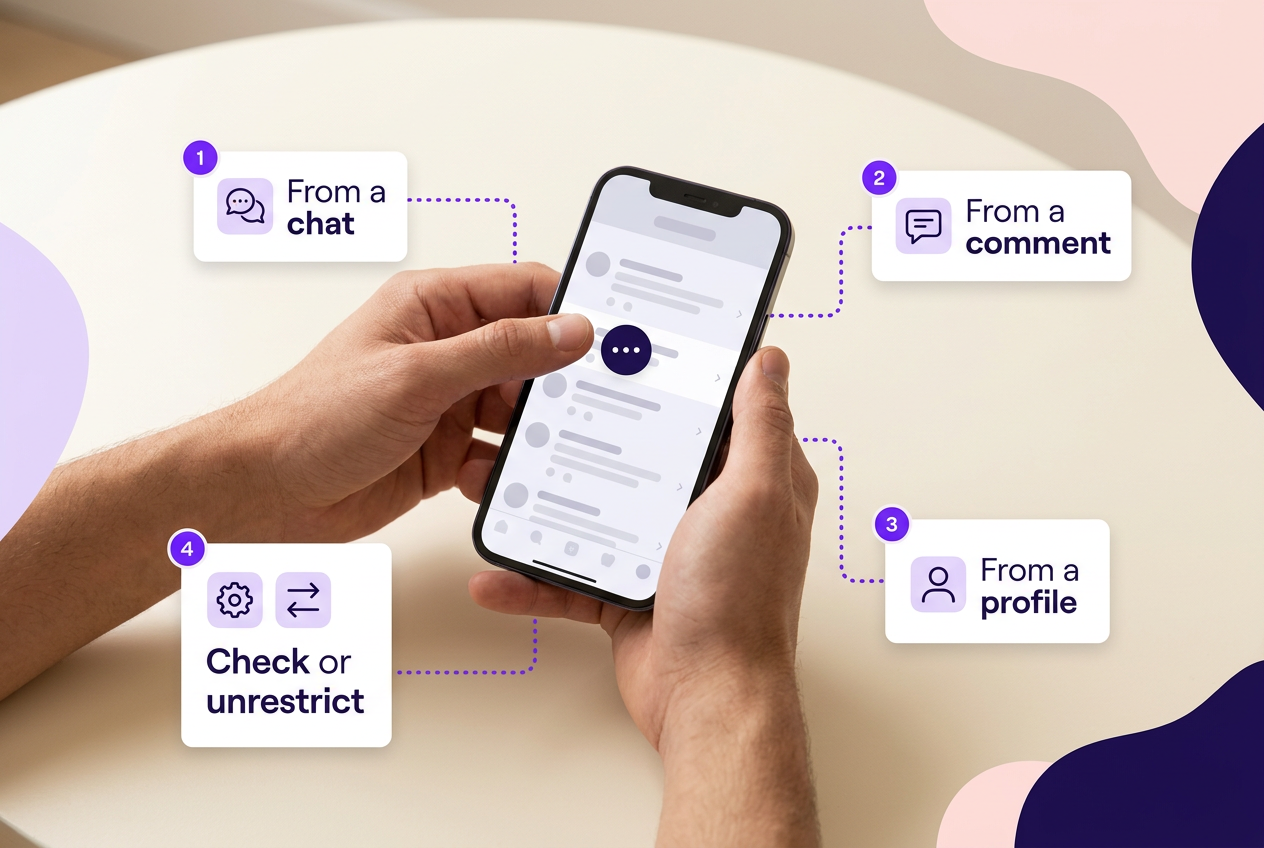
Instagram documents several entry points for restricting someone rather than one single path — you can do it from a chat, from one of their comments, from their profile, or from a Restricted-accounts setting, and the exact steps differ by surface. Menu wording and placement can shift with app version, so treat any specific label as a starting point rather than a fixed map.
- Open the chat, comment, or profile belonging to the account you want to restrict, and look for the restrict option in that surface’s menu.
- Confirm the action where prompted — Instagram applies it immediately.
- To check who’s currently restricted, look in your privacy or Restricted-accounts settings if that area is available on your app version, where the platform lists accounts you’ve restricted.
- To reverse it, open the same settings area or the person’s profile and select the unrestrict option; this doesn’t require blocking or unblocking them first.
One documented exception worth knowing: on Instagram Lite, restricting someone is only available through their profile, not through chats or comments.
For threats or harassment, Restrict is not the full safety response
If what you’re dealing with is harassment, threats, or anything that feels like a genuine safety risk, Restrict is the wrong tool to lean on alone — it manages your view of the account, not your exposure to it. Instagram’s own guidance for bullying or harassment points to reporting the account, photo or comment directly, and considering a block once that report is filed, per Instagram’s harassment reporting guidance. Reporting doesn’t guarantee removal or any specific enforcement outcome, so treat it as one part of a response rather than the whole of it.
Frequently asked questions
Does restricting someone affect shared group chats?
Yes, but only in a limited, documented way. If you restrict someone who’s in a group chat with you, Instagram shows a warning about their presence in that thread, and you can choose to stay in the group or leave it.
Does Restrict work the same way on Instagram Lite?
Not entirely. Instagram’s documentation notes that Lite users can only apply Restrict through a person’s profile, rather than through the chat or comment entry points available on the standard app.
 120,000+ creators say yes
 Real Active Accounts


 Username Generator
  Hashtag Generator
  Font Generator