
Instagram Hashtags: How to Choose, Adapt, and Review Tags for Each Post
Choose Instagram hashtags as a post-specific set: start with the exact subject, medium, service, or result shown, then add community, location, campaign, seasonal, or timely tags only when they genuinely apply to that post. Skip generic labels, engagement-bait phrasing, and follower-exchange tags that describe an outcome rather than the post.
Most hashtag advice still treats tags as a numbers game — grab a popular list, paste it under everything, and hope reach follows. That approach produces the same generic block on every post, and it can’t tell a finished portrait from a booking update, or a client result from a shop event. This guide sorts hashtags by the job they do on a specific post, then shows how creative accounts, local services, and small businesses can adapt the same modules instead of copying someone else’s list. Along the way it flags where the usual shortcuts — random rotation, borrowed trends, third-party boosting — cost more than they return.
What Instagram hashtags should you use?
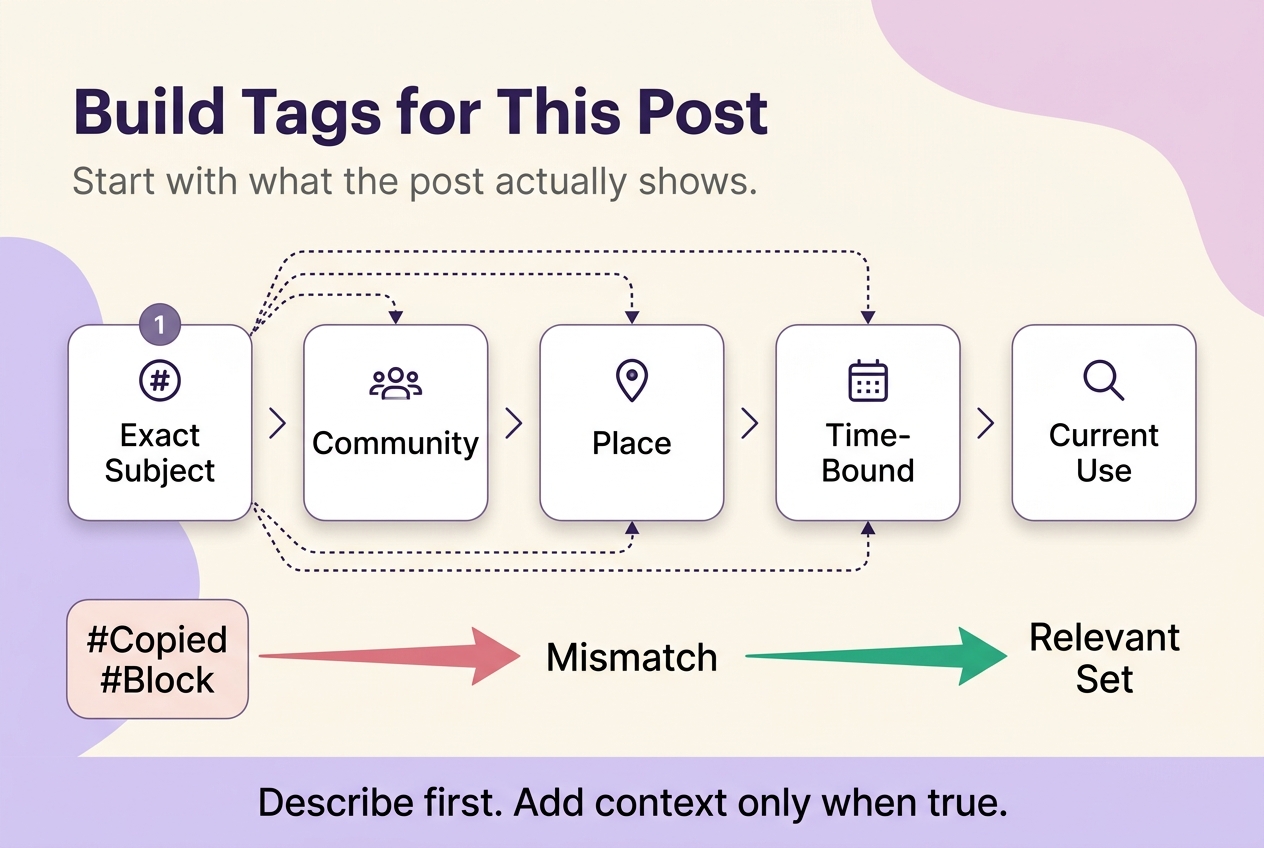
Use a post-specific set built for the single post in front of you, not a fixed block copied onto every caption. Start with a tag that names the exact subject, medium, service, or result the post shows, then add a community, location, campaign, seasonal, or timely tag only when that context is genuinely true of this post. Skip generic labels, engagement-bait phrasing, and follower-exchange tags — they describe an outcome you want, not what the post actually is. There’s no universal optimal count to chase: add only the tags that pass this relevance check for this specific post, and stop there.
Work through that order deliberately: subject first, audience or community second, place third, and anything time-bound last — treated as optional, not as a starting point. The most common mistake runs the order backward: picking a trending or seasonal tag first and forcing the subject to fit it, instead of describing the post and then checking whether a timely tag genuinely applies.
A barber’s client-result photo, a booking-availability update, and a shop-opening announcement can come from the same account, and none of them should carry the same tags. The result post is about the cut and the technique. The booking post is about availability and service. The event post is about a date and a location. One copied block can’t carry all three without misrepresenting at least two of them.
Topic tags: describe the asset first
The clearest hashtag names what’s literally in the frame: the haircut style, the workout move, the paint medium, the product category, the process being shown. A tag built from a job title alone — photographer, barber, artist — describes the account, not the post, and gives a reader nothing to filter for that a hundred other posts with the same title tag haven’t already claimed. Naming the specific medium, subject, or process instead makes the post’s subject clearer to anyone scanning hashtags for that particular style — a profession label alone can’t do that.
Add context only when the post genuinely has it
A mobile dog-grooming business posting a before-and-after photo has at least three possible context layers: the service performed, the neighborhood it operates in, and a specific occasion — a seasonal package, a holiday promotion, a rescue-partnership event. Not every post carries all three. A city tag added to a post with no local relevance just adds noise, and a seasonal tag left on a month after the season ends misrepresents timing.
Add a community tag when it names real participants, a place tag when the location matters to what’s shown, and a campaign tag only when an actual organizer or campaign is attached to the post. A location hashtag communicates place to a reader, not a way to target specific viewers — assuming otherwise wastes a tag slot on a mechanism the platform doesn’t document.
Build the set for the post—not the account
A repeatable order beats a fixed list, because the order forces you to check relevance instead of assuming it. Use this sequence for each post:
- Define the subject and the audience task of this specific post.
- Check whether place, campaign, season, or a live conversation genuinely applies.
- Pull matching tags from saved modules organized by post task, not from one account-wide block.
- Read each tag in current use before publishing, not just as you remember it.
- File any new, useful combination under the task it served, not under your account name.
The check in step four matters more than it looks. A phrase that reads as neutral in your own head can carry irony, controversy, or a different audience expectation in current use — the only way to know is to look at how it’s being used right now, not what it meant when you first saved it. Skip that check and you can schedule a caption that quietly attaches your post to a conversation you never intended to join.
It also helps to know what hashtags are not confirmed to do. Meta’s own description of how Instagram selects recommended Feed posts talks about AI-based selection using activity and content characteristics under policy constraints — it doesn’t list hashtags, captions, or comments as individual inputs. Treat tag choice as a relevance and Search-discovery decision, not as a documented Feed recommendation lever.
Popular, trending, and evergreen tags have different jobs
Popular hashtags are broad, long-established labels that stay in heavy use regardless of the news cycle. Trending hashtags belong to a live, time-bound conversation and lose their meaning once that conversation moves on. Evergreen hashtags describe a stable topic, craft, or community that doesn’t depend on timing at all. None of the three is inherently better — a popular tag can be too broad to help anyone find your specific post, and a trending tag that fit yesterday can misrepresent a scheduled post today.
A tag that read as accurate while you were drafting a post can read as stale, or attached to a different conversation entirely, by the time a scheduled post actually goes live. Check it again just before publishing, not only when you first saved it.
Adaptable modules for creators, local services, and small businesses
A photographer, a gym, and a bakery all need hashtags, but they’re not building the same set. The modules below are adaptable starting points organized by what the post actually asks the audience to do — not universal best lists, and not proof that any particular tag performs better than another. Swap in your own specifics before you post.
Artists, photographers, and makers
A photographer posting a finished portrait, a behind-the-scenes shot from a shoot, and a now-booking announcement are doing three different jobs, even though “photographer” fits all three. The portrait post benefits from medium and style language — film, editorial, black-and-white. The behind-the-scenes shot benefits from process language — location scout, lighting setup, session prep. The booking post benefits from service and availability language, not a style tag at all. The same logic carries to painters, illustrators, and other makers: medium, style, subject, and — when it genuinely applies — commission or event context do more work than repeating the craft title.
Service, event, and community accounts
A gym, an independent trainer, a barbershop, a DJ, and a church can share a broad category while asking very different things of an audience. A gym’s class-schedule post is asking someone to show up at a time. An educational post from a trainer is asking someone to learn a technique. A barbershop’s result photo is asking someone to book a similar cut. A DJ’s set announcement is asking someone to attend a specific date and venue. A church’s event post is asking someone to attend a specific gathering. Separate the tag that names the service or education from the tag that names the event or venue, and skip any tag that assumes something about who’s likely to attend.
Local services, city context, and ecommerce
A city name alone is often too broad to be useful — it says nothing about what’s for sale or where in the city it’s available. Pairing the service or product with an occasion and a service-area detail gives a reader something to act on: what can be booked, bought, attended, or requested, and roughly where. A nationwide ecommerce shop faces the opposite problem — a city tag may be irrelevant to a product that ships anywhere, and forcing one in because it reads as popular adds noise instead of context.
| Account situation | Post task | Tag roles to consider | Adapt with words like | Context to avoid |
|---|---|---|---|---|
| Finished creative piece | Showcase a completed result | Medium, style, subject | film, editorial, black-and-white | A broad craft title used alone |
| Creative process update | Show behind-the-scenes work | Process, technique, setting | location scout, lighting setup, session prep | Sales language when nothing’s for sale |
| Booking or availability post | Prompt a booking or inquiry | Service, availability, place | service name, “now booking,” neighborhood | Aesthetic-only tags with no service context |
| Class, session, or set announcement | Prompt attendance at a specific time | Event, date, venue | event name, date, venue | Assuming who’s likely to attend |
| Local service post | Prompt a local booking or visit | Service, occasion, service area | service + occasion + neighborhood | A city name with no service or occasion attached |
| Nationwide product post | Prompt a purchase from anywhere | Product, occasion, buyer intent | product name + occasion + intent phrase | A local tag irrelevant to shipping range |
Match hashtag context to the format and audience task
The same subject can become a process Reel, a saveable carousel, and a same-day Story, and each version asks the audience for something different — which changes what the tags should emphasize, not because one format ranks hashtags differently, but because the audience task differs. A process-focused Reel benefits from tags describing the technique or transformation being demonstrated. A carousel built as a mini-guide benefits from a topic or educational tag matching what someone would search to learn the subject. A feed post announcing a finished result or an update benefits from a tag naming the outcome or the announcement itself. A Story’s hashtag, if you use one, mostly signals immediate context to whoever’s already watching rather than a way to reach people who don’t follow you.
Hashtag-related behavior has changed by format before and can change again, so confirm what a given surface currently supports rather than assuming a habit that worked on one format carries over to another.

Use a trend only when the live conversation fits
Trending is often read as a shortcut — grab whatever’s active and borrow its attention. That fails as often as it works, because volume tells you nothing about what a phrase currently means. A phrase can be trending because of a joke, a controversy, or an event entirely unrelated to your post, and attaching your content to it can misrepresent what you’re posting. Before using a live tag, check what’s actually showing up in results for it right now: is the tone consistent with your post, is the topic still current, does the context match your audience’s expectation? If any of that is unclear, use an accurate evergreen or community tag instead — a slightly smaller, correctly labeled audience beats a public mismatch every time.
Relevance—not random rotation—keeps a hashtag library useful
The mistake isn’t reusing hashtags — it’s reusing them without checking whether they still describe the post. Rotating tags for the sake of variety, swapping one unrelated label for another so the set “looks different” each time, doesn’t make a set more relevant; it just trades one mismatch for another. A saved module stays useful only when every tag in it is still accurate for the post you’re publishing today — the same discipline as building the set the first time, applied on reuse instead of from scratch.
This is also where the line into unsafe tactics sits, and it’s a hard line, not a gray area. Meta’s Spam Community Standard prohibits content designed to deceive, mislead, or overwhelm users in order to artificially increase viewership, and in a 2018 announcement, Instagram said it would remove inauthentic likes, follows, and comments generated through third-party apps built to boost popularity, and notify the accounts affected. Ordinary hashtag reuse isn’t the violation either policy describes. Pods, follow/unfollow cycles, purchased engagement, auto-commenting, and DM blasting fall outside this article’s editorial line for a different reason — they’re manipulation tactics this guide excludes regardless of hashtag choice, and none of them make a hashtag more relevant to the post it’s attached to.
Review hashtag choices with comparable posts
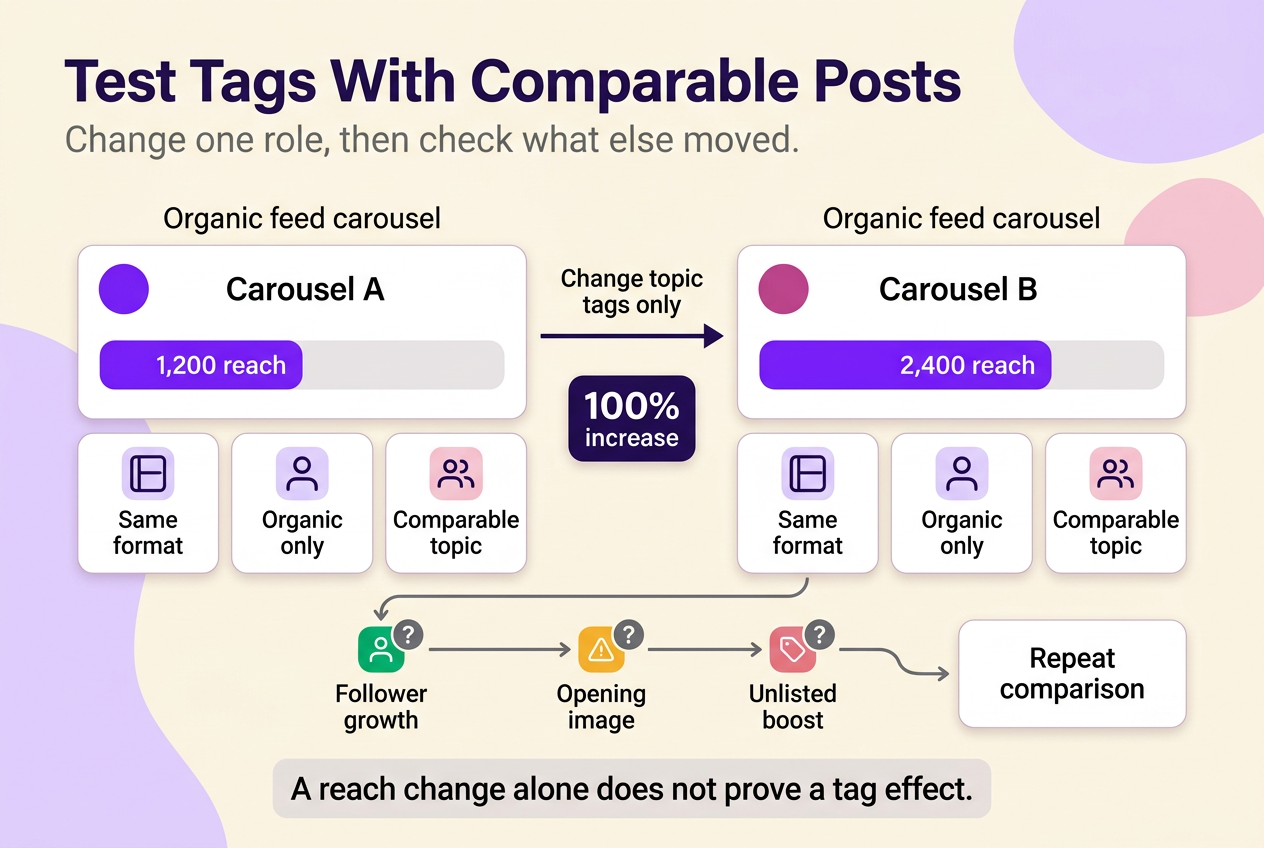
Reach, views, and interactions are not the same measurement, and crediting hashtags for a jump in one when something else moved is the single most common mistake in tag testing. Pick one outcome, use whatever your Insights panel currently labels it, and compare it only across posts that share format, topic, and organic-versus-paid status. A Reel that ran as a paid promotion and an organic carousel can’t isolate a hashtag effect, because paid distribution, creative format, and audience overlap all differ at once.
For example, illustrative arithmetic, not a reported result: a plant-shop account posts two comparable organic feed carousels two weeks apart, changing only the topic tags between them. The first carousel reaches 1,200 accounts; the second reaches 2,400 — a 100% increase using the first carousel’s reach as the base. Before crediting the new tags, the account owner checks whether anything else changed: a larger following by the second post, a stronger opening image, or an unlisted boost.
Log which tag roles you used — topic, community, place, campaign, seasonal — on each post, and change one role at a time between comparable posts. Only when format, audience size, and promotion status are genuinely matched does a tag change become a plausible explanation rather than one of several, and even then, repeat the comparison across more than one pair of posts before you retire or keep a module.
“Banned hashtags” are not one diagnosis
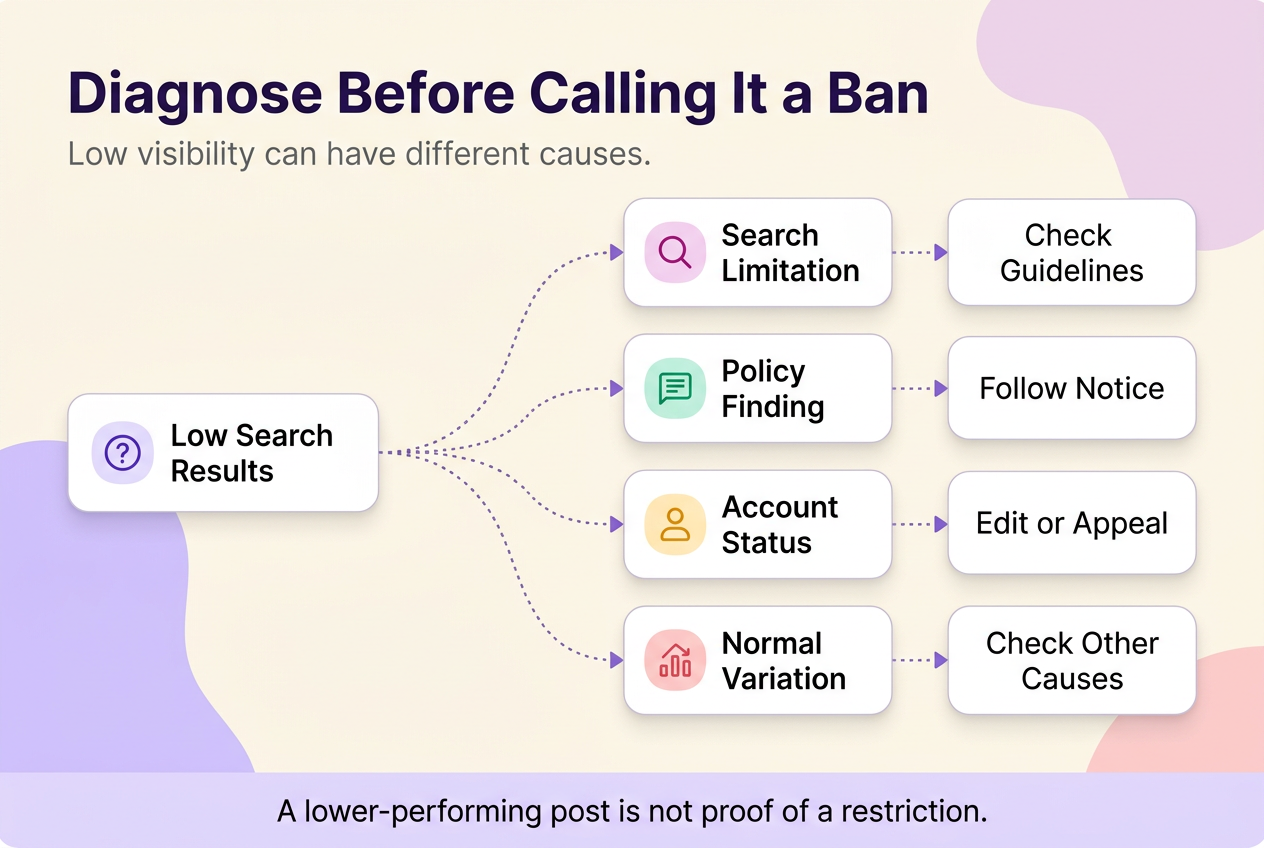
“Banned hashtag” and “shadowban” are practitioner terms, not documented Instagram states, and they cover at least four different situations that call for different responses:
- A hashtag returning no or limited results in Search is not, by itself, proof of a “ban.” As of August 2026, Instagram says Search removes accounts, posts, and hashtags that violate its Community Guidelines and avoids showing those that go against its Recommendations Guidelines; check any actual notice or eligibility status separately rather than assuming either from the result count alone.
- A documented policy finding on a specific post or account names what happened and what to do — treat that instruction literally, not as a hashtag problem.
- Account Status tells you whether your content or account is currently eligible for recommendation to non-followers, with options to edit content or appeal — open it from your account settings and read what it actually says.
- Ordinary performance variation — a post that simply reached fewer accounts than usual — isn’t evidence of a restriction by itself, and pinning it on a hashtag skips every other explanation a lower-performing post can have.
Menu names and where a feature sits can shift by app version, account type, and region, so treat the feature name as the anchor and confirm its current placement inside your own app rather than following an old screenshot.
Caption or comment?
No published evidence establishes that captions and comments get equal treatment, or that one placement outperforms the other — Instagram hasn’t published that comparison. Write the caption to be read first, place hashtags wherever keeps it cleanest for your account, and verify current caption, comment, and editing behavior in your own app before treating placement as a reach lever.
Build one reusable module for your next post
Pick the scenario closest to your next post, build one tag set specific to that post’s task, and save it under the task — a client result, a booking update, an event, an educational post — rather than as one block for your whole account. That’s the difference between a set of Instagram hashtags built for one post at a time and a static block copied everywhere. For broader post-planning beyond tag selection, the Instagram content creation hub covers the rest of the workflow.
No method guarantees a specific number of followers, views, or income. Results depend on niche, content quality, and account history.
 120,000+ creators say yes
 Real Active Accounts


 Username Generator
  Hashtag Generator
  Font Generator