Instagram Story Ideas: Choose What to Post by Goal
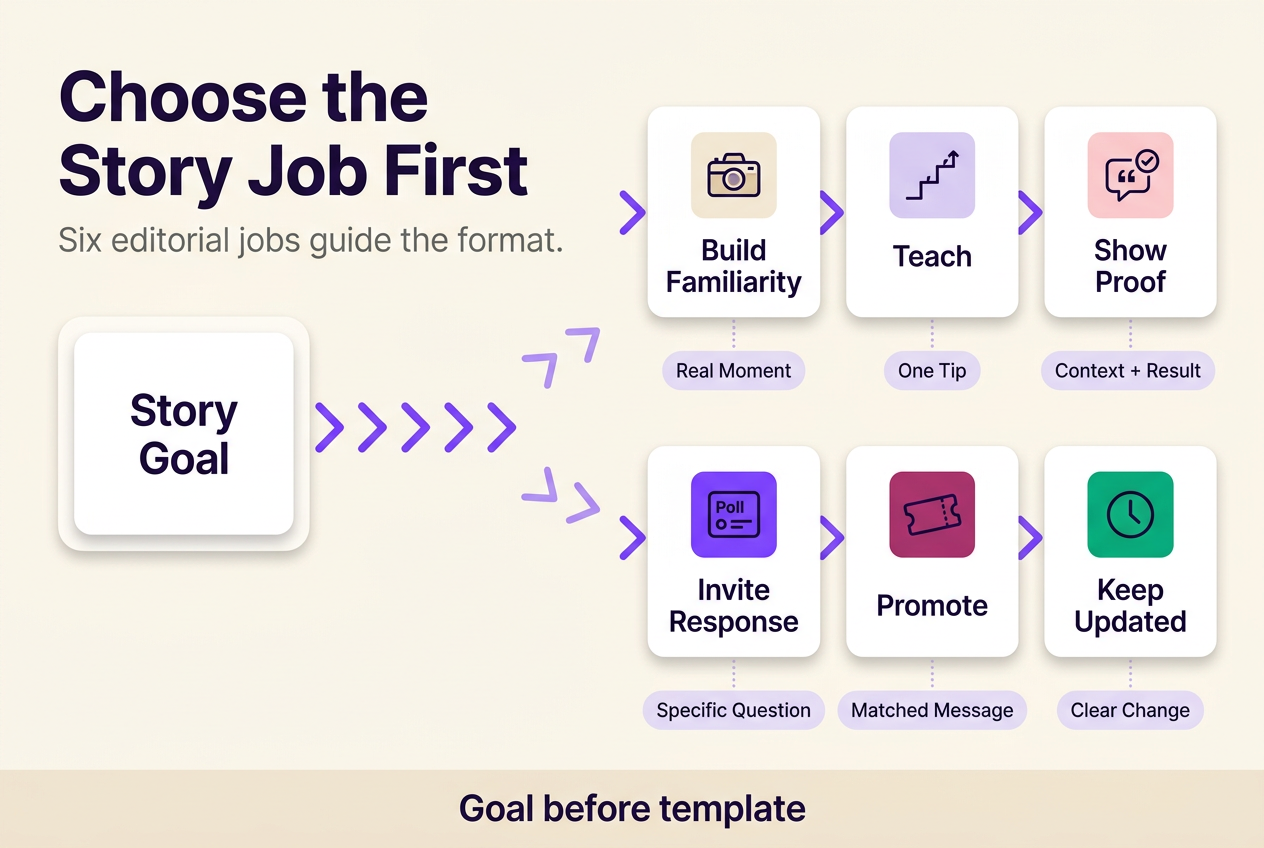
Instagram story ideas work best when the job comes before the template. Six editorial jobs cover most Stories:
- Build familiarity with a real, in-context moment
- Teach one useful tip or decision
- Show proof with context, not just praise
- Invite one clear, specific response
- Promote with a message structure that matches the offer
- Keep existing followers current on real changes
Pick the goal first, then choose the format that fits it.
Most Story ideas fail for the same reason: they borrow a format that worked for someone else without deciding what that Story is supposed to do for this account. This guide sorts ideas by the job they need to complete — building familiarity, teaching, proving, inviting a response, promoting, or keeping followers current — then shows how to pick a format, build a short sequence, and keep the whole thing from turning repetitive. It also covers where Stories fit next to Feed posts, Reels, and Highlights, how Highlight covers should work, and when reposting into your Story is the right move instead of a screenshot. The point is a repeatable way to choose the next Story, not a longer list to scroll past.
On this page
What to post on Instagram Stories: start with the job the Story must do
Every Story that works is doing one of six jobs: building familiarity, teaching something useful, proving a claim, inviting a specific response, promoting an offer or event, or keeping current followers informed. None of these jobs is a format — a poll can collect a preference, gather feedback, or generate light conversation, depending on what you actually ask. Decide the job before you decide whether the Story is a photo, a video, a text card, or a repost. These six jobs are an editorial way to sort ideas, not Instagram’s own categorization; the platform’s native tools sit underneath whichever job you choose, not the other way around.
Build familiarity
A product photographer filming five seconds of packing lenses before a shoot is building familiarity — not just documenting a task. The Story only earns that job if it carries a line telling the viewer why the moment matters to them, not merely that it happened.
Teach one useful thing
A Story teaches when it answers one decision or step, not a full workflow squeezed onto five cards. If a tip needs more than a couple of cards to make sense, split it into a series instead of compressing it, or the viewer taps through before the point lands.
Show proof without making every Story a sales pitch
Proof is stronger when it explains what was chosen, changed, or solved than when it’s a bare compliment screenshot. A short client comment paired with the decision it responds to reads as evidence; the same comment alone, floating with no context, reads as an ad.
Invite participation with a clear question
Use an interactive sticker only when you need one defined response — casual conversation, a preference that informs a real decision, a question round-up, or feedback on something you’re building. Instagram also provides a setting for managing who can reply to a Story with a message, which matters once you’re actually asking for something specific.
Promote with the right message structure
Treating every promotion like an announcement is why promotional Stories start to blur together. Announcements explain what’s new, proof reduces doubt, urgency names a real deadline or limited availability, invitations explain how to join, and offers state their terms plainly — match the structure to what’s actually happening, not to whatever you used last week. When a business partner is involved, for accounts with access, Meta’s branded-content policies require branded content to use the branded content tool. FTC disclosure guidance says a material relationship should be obvious, hard to miss, and understandable — a platform label alone may not settle every disclosure obligation.
Keep existing followers informed
A studio changing weekend hours only helps returning followers if the Story says what changed and what to do now, not just that an update exists. A reminder with no new information starts to read as noise instead of a service.
| Editorial job | Asset you likely have | Story treatment | Response needed | Viewer’s next action |
|---|---|---|---|---|
| Build familiarity | A real moment or routine | Short video or photo with a framing line | None required | Recognizes the person or process behind the account |
| Teach one useful thing | A tip, step, or clarification | One or two cards, plain text or voiceover | None required | Applies the tip or step |
| Show proof | A result, testimonial, or finished piece | Photo or video paired with the decision it responds to | None required | Trusts the claim enough to consider it |
| Invite participation | A genuine open question | Poll, question, or quiz sticker | A specific reply, vote, or answer | Responds once, with a defined input |
| Promote | An offer, event, or launch | Announcement, proof, or invitation card matched to the situation | Click, save, or attend | Takes the stated commercial or event action |
| Keep followers informed | An update or operational change | Plain text or short video stating what changed | None required | Adjusts expectation or behavior based on the update |
Choose a format after you choose the objective
A Story’s format — photo, video, text card, repost, or an interactive sticker — should be the last decision, not the first. Once you know the objective, the audience’s current familiarity with the topic, and the one action you want next, most format choices settle themselves: teaching favors a text card or short demo, proof favors a video or before-and-after photo, and participation favors a sticker built around a specific question.
The order that holds up: pick the action first, then the asset you actually have rather than the one you wish you had, then the audience’s context, and only then the template. A polished template applied backward — pick the sticker, then invent a reason to use it — is a common way Stories start to feel repetitive, because the sticker becomes the message instead of serving it.
A repost is often a weak opening card, because it assumes the viewer already understands why the shared post or Reel matters; add a line of context before or alongside it rather than letting the shared asset carry the whole message alone. And if the account is public and a Story carries a location tag, that Story may appear on additional surfaces such as Instagram’s map — one more reason a location-based Story needs a purpose beyond the tag itself. Feature names and menu placement for stickers and tags change over time, so confirm the current options inside your own composer before relying on a specific one.
Turn one topic into a coherent Story sequence
Picture a ceramics maker who wants to sell out a small batch of mugs by Friday. Instead of posting five unrelated Stories across three days, she builds one sequence: a hook card showing the finished batch, a context card explaining sizes, glazes, and price, a proof clip of the previous batch being unboxed, and a final card with the order link and cutoff time. Each card exists because the next one needs it — the hook earns attention, the context answers the obvious question, the proof removes doubt, and the last card asks for the one thing that matters. That’s a hypothetical promotional sequence, meant only to show the logic, not a documented template.
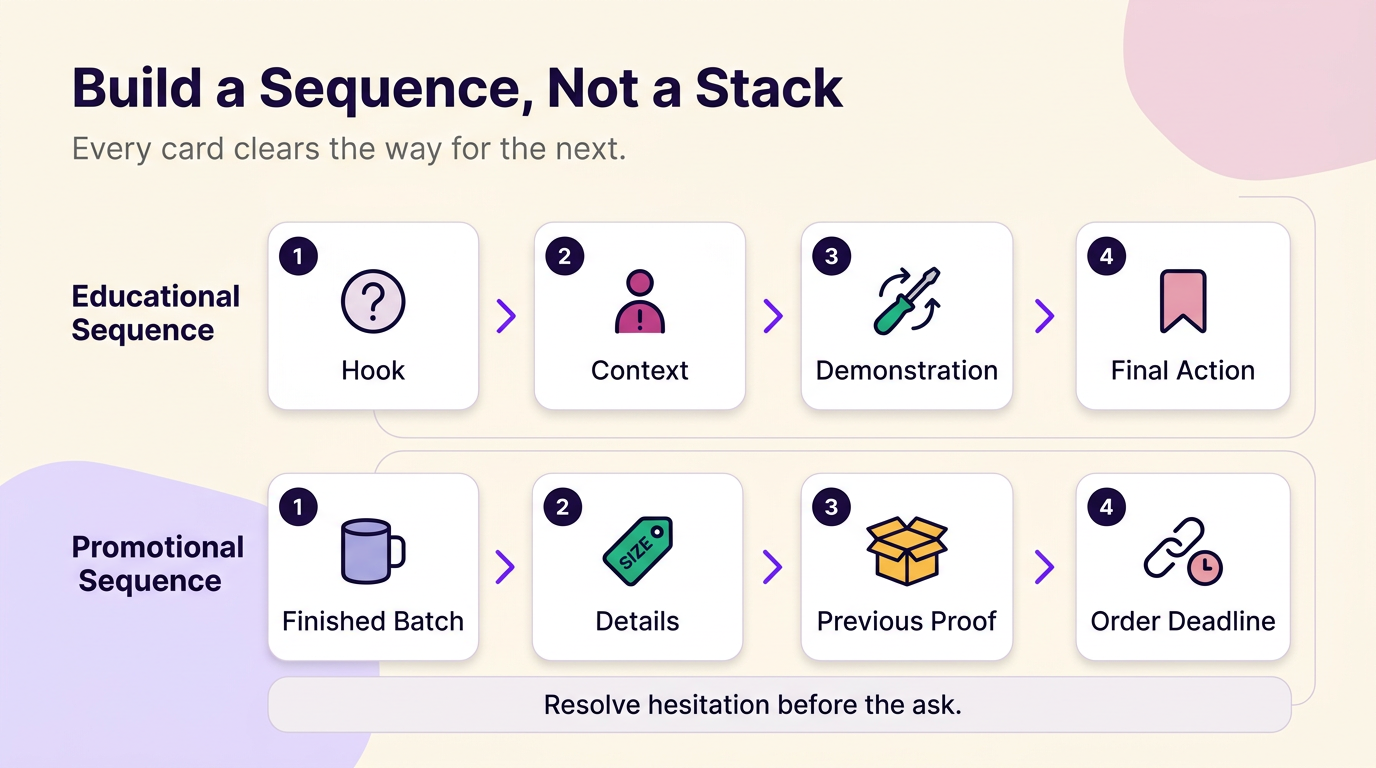
An educational sequence follows the same logic toward a different destination. A hook names the mistake or question, a context card explains why it happens, a demonstration shows the fix in action, and a final card either recaps the step or points to where the fuller version lives — a saved post, a Highlight, or a linked resource. Interaction only belongs in either sequence if it serves the objective already chosen; a poll dropped into the middle of a promotional sequence just to include a poll rarely earns its place.
Decide the final card’s action before drafting the first one. Sequences fall apart when the last card introduces a new ask — a discount code, a follow request, an unrelated topic — that earlier cards never set up. If a viewer would be confused about why the sequence ended where it did, look at the structure before touching length or card count.
Stop repetitive Stories without losing your visual theme
The usual fix for repetitive Stories is a new template, and it’s usually the wrong fix: swapping colors or fonts while repeating the same offer and the same call to action is cosmetic variation, not real variation. Followers notice the message repeating long before they notice the palette changing.
Rotate at least one substantive variable between Stories that otherwise look similar — the objective, the asset type, the visual treatment, or the requested action — while keeping a consistent editorial theme: the subjects, tone, and recurring formats a follower learns to expect from the account. Building a theme that holds up doesn’t require a template pack; it’s usually built from three or four recurring subjects, not a color scheme. That’s different from grid layout, which is about how posts sit next to each other on the profile — a Feed-specific decision, not something to fold into Story planning.
The failure runs in both directions. Changing subject, tone, format, and call to action all in the same week makes an account unrecognizable; changing nothing but the color makes it monotonous. Pick one variable to rotate per Story and hold the rest steady long enough for a pattern to form.
Make each Story card easy to understand
The numeric specifications on record — a 9:16 ratio and 1080×1920 resolution with a 600×1067 minimum — are documented for Instagram Stories ad placements, not for the Stories you post organically for free. Nothing in that documentation establishes them as a requirement for organic posting, so treat them as a reference point rather than a rule, and let the checks below carry the actual decision.
What you can check without guessing: open the Story composer and confirm the full canvas is visible before relying on a design made elsewhere, since text or logos placed near the edges in an external tool can end up hidden behind captions, stickers, or the reply bar once those are added inside the app. Check contrast against both a light and dark background if your Story rotates between them, and confirm captions haven’t pushed key text out of frame. A design that looks finished in an editor still needs this pass inside Instagram itself.
Give Feed posts, Reels, Stories, and Highlights different jobs
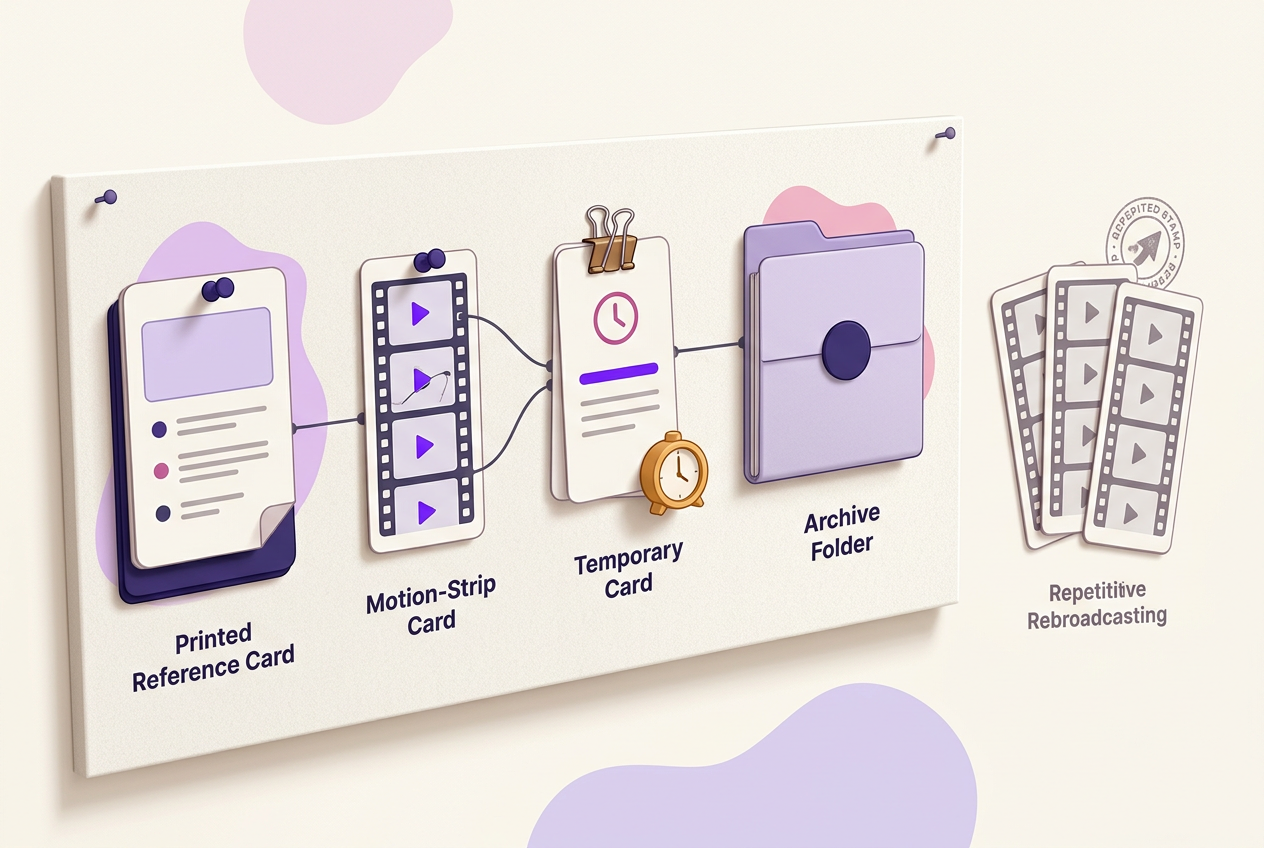
Stories carry timely context and short interactions; Feed posts and Reels carry the durable version of the same idea; Highlights hold whatever stays useful after the timely moment passes. Treat a Story that shares a Feed post or Reel as a teaser with a reason attached, not a rebroadcast — a framing line or a cover frame explaining why it matters right now does more work than the repost alone.
If you’re building out feed ideas for the permanent grid, plan those posts to hold up on their own, months later, without a Story’s timely framing attached. A Story then becomes the announcement that new Feed content exists: in the Instagram app for Android and iPhone, tap the share icon under the photo, video, or Reel, choose the option to add it to your story, then tap share.
Duplicating the exact same asset across Feed, Reel, and Story with no added context doesn’t give a viewer three reasons to engage — it gives them the same reason three times. A plan that actually works assigns each surface a different job: the Feed post or Reel is the reference version, the Story is the timely nudge toward it, and the Highlight is where it lives once the moment has passed.
Save useful Stories to Highlights—and make the covers easy to scan
The usual advice — save your best Stories to Highlights — breaks down once a profile has a dozen Highlights and a visitor can’t tell which one answers their question. A Highlight earns its place when the Story inside it is still useful after the timely moment has passed: a services list, an FAQ, a set of locations, or details about a recurring event outlive their original 24 hours; a one-time promotion or a dated announcement usually doesn’t.
Archived Stories stay private unless you choose to share them. If Stories archive is turned off, Stories shared from that point onward are deleted after 24 hours, so confirm archiving is enabled before relying on archived Stories for future Highlights. From there, Instagram lets you select archived Stories, name a Highlight, choose a cover photo, and save it to your profile.
Cover choice matters more than cover style. A visually consistent set of covers — same color treatment, same icon style — fails if a visitor still has to open three Highlights before finding the one about hours or pricing. Good highlight cover ideas are literal before they’re decorative: a camera icon for behind-the-scenes, a price tag for pricing, a pin for locations. Retire Highlights that no longer answer a current question — an expired promotion left at the front of a profile competes with the information a new visitor actually needs.
Repost to your Story when native sharing adds context
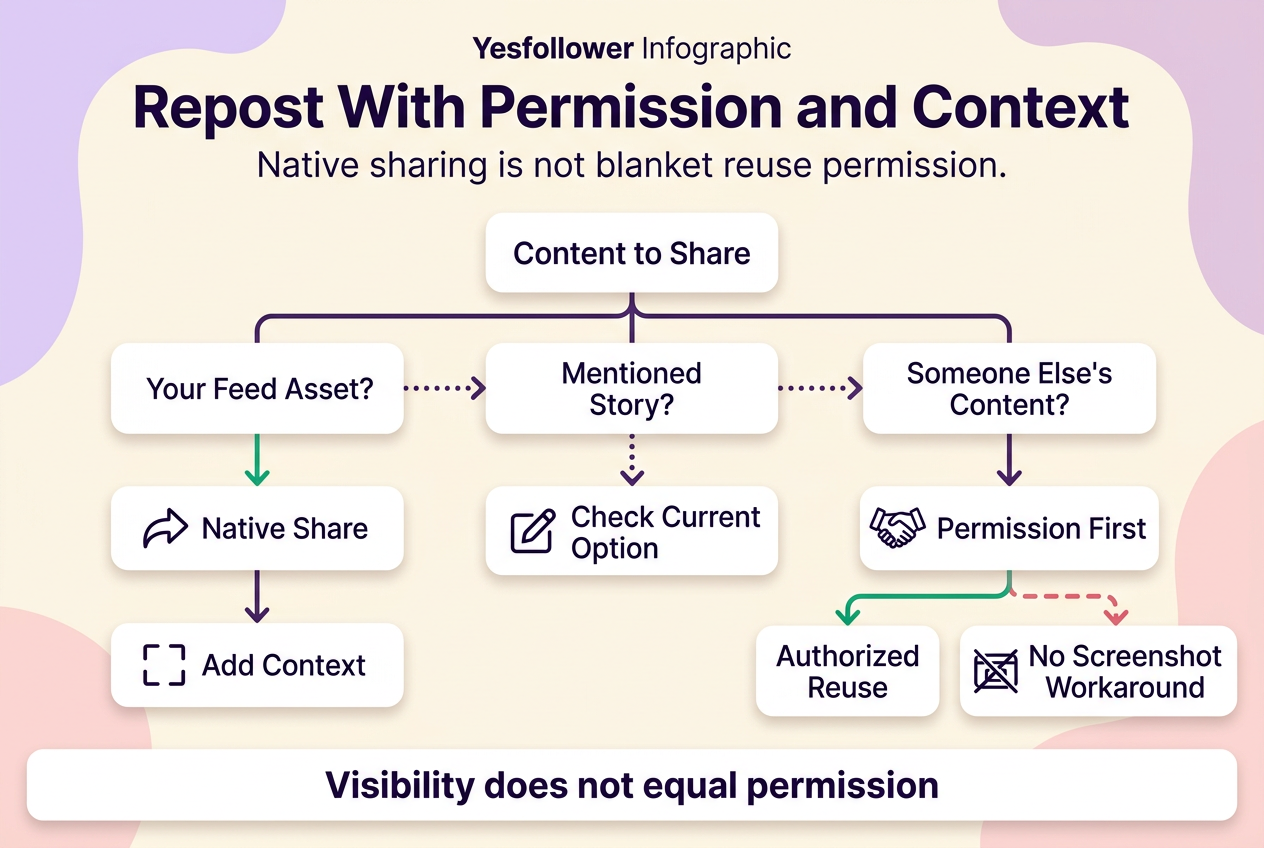
“Just repost it” isn’t one action. Reposting a Feed photo or video, reposting someone’s Reel, resharing a Story that mentions your account, and recreating a screenshot because native sharing isn’t available are four different situations with different permission requirements, and treating them as interchangeable is how attribution and permission problems start.
For Feed posts, videos, and Reels, Instagram’s native path is the same on Android and iPhone: tap the share icon below the post, choose the option to add it to your story, then tap share. Use this documented path when it’s available and the source is a Feed asset you’re allowed to see and share — it’s the more transparent way to handle how to repost a story to your story than a screenshot, though having the technical ability to share something doesn’t by itself establish copyright permission to reuse it.
A Story where your account is mentioned is a different case. The documented native path above covers Feed photos, videos, and Reels — it doesn’t establish a Story-to-Story mention-resharing procedure, so check the current option inside your own composer rather than assuming it works the same way every time. When that option isn’t available, or the source content isn’t yours, don’t default to a screenshot as a workaround. Meta’s policy on third-party intellectual property prohibits content that infringes another person’s intellectual-property rights; use content authorized by the rights holder, or only where established fair-use principles apply. A screenshot or recreation doesn’t itself establish either condition, so ask the source directly before recreating their material, and use native sharing when it’s documented and available rather than assuming a public post is automatically reusable.
Adapt the same Story system to the assets your niche already has
A restaurant, a photographer, and a musician don’t need different Story strategies — they need to plug different real assets into the same six jobs. A restaurant already has menu items, prep moments, table availability, and regulars who return; a photographer already has session setups, edited-versus-unedited comparisons, and client reveals; a musician already has rehearsal clips, studio moments, release countdowns, and the audience that shows up at shows.
For Story ideas built around a restaurant, familiarity comes from prep and staff moments, teaching comes from explaining a dish or technique, proof comes from a genuinely satisfied table’s reaction shared with their permission, and retention comes from same-day availability or hour changes.
For Story ideas built around a photographer, and the broader content ideas for photographers that sit next to them, familiarity comes from behind-the-lens setup shots, teaching comes from explaining one settings or posing decision, proof comes from a before-and-after edit, and retention comes from a booking-window reminder — always with the subject’s permission before any client image goes up.
For Story ideas built around a musician, familiarity comes from rehearsal or writing moments, teaching comes from explaining one part of the process, proof comes from a genuine audience reaction at a show, and retention comes from release dates and venue changes fans need to plan around.
The asset changes by niche; the objective doesn’t. A restaurant’s hours update and a musician’s release reminder are both doing the same job — keeping people who already expect updates on schedule.
Use this checklist before publishing your next Story
Before you publish, confirm four things: one objective, one audience action, one asset, and one format that fits both. Then run three quick checks: readability inside the actual Story composer, permission for anyone else’s face, quote, or content in the frame, and whether the Story has lasting reference value or is genuinely disposable.
If the content is personal or not meant for everyone who follows you, Instagram’s setting for hiding a Story from specific people is worth checking before you post, not after.
See the Instagram content creation guides hub for related planning resources.
Disclosure requirements depend on the specific relationship and jurisdiction; the FTC and Instagram guidance referenced above describes general principles and isn’t legal advice.
No method guarantees a specific number of followers, views, or income. Results depend on niche, content quality, and account history.
 120,000+ creators say yes
 Real Active Accounts


 Username Generator
  Hashtag Generator
  Font Generator