
Good Instagram Captions: How to Choose, Write, and Adapt Them for Any Post
A good Instagram caption matches one clear job to what the post doesn’t already show:
- Adds missing context to a visual
- Tells a story with a real shift
- Teaches or clarifies one specific point
- Sets a specific, non-generic mood
- Invites one relevant, optional next step
Every caption on Instagram does a job, whether the writer planned it or not — even a blank caption tells followers the image needs no explanation. Captions start to feel interchangeable when tone gets picked before the job does. This guide sorts captions by what they need to accomplish rather than by occasion, so the same system covers a product carousel, a teaching post, and a moody feed photo without repeating itself. It also separates the caption itself from the text layers built into Reels, because writing a caption and building an accessible Reel are two different tasks that often get confused under the same word.
On this page
What makes a good Instagram caption?
A good Instagram caption does one clear job for the post it’s attached to: it adds context the image or video doesn’t supply, makes a specific observation, teaches or clarifies something, tells a story with an actual shift in it, or invites a next step that’s genuinely optional. Nothing about caption quality is fixed to a word count. A product close-up might need a full paragraph of material and care details; a photo that already explains itself might only need one honest line. The test isn’t short versus long — it’s whether the caption adds something the visual can’t show on its own.
That test also rules out judging captions by mood words or hashtag count. A caption stacked with generic phrases can still fail the post if it never states the one thing a viewer actually needed to know — a price, a date, a name, a warning, a reason. No combination of wording, structure, or length is documented to raise likes, reach, follows, or sales on its own. What can be checked, post by post, is fit: does this caption match what the image doesn’t already say, for the audience actually seeing it. That’s a lower bar than “engaging” or “aesthetic,” and it’s the only one a writer can verify before publishing rather than after.
Pick the caption’s job before you pick its vibe
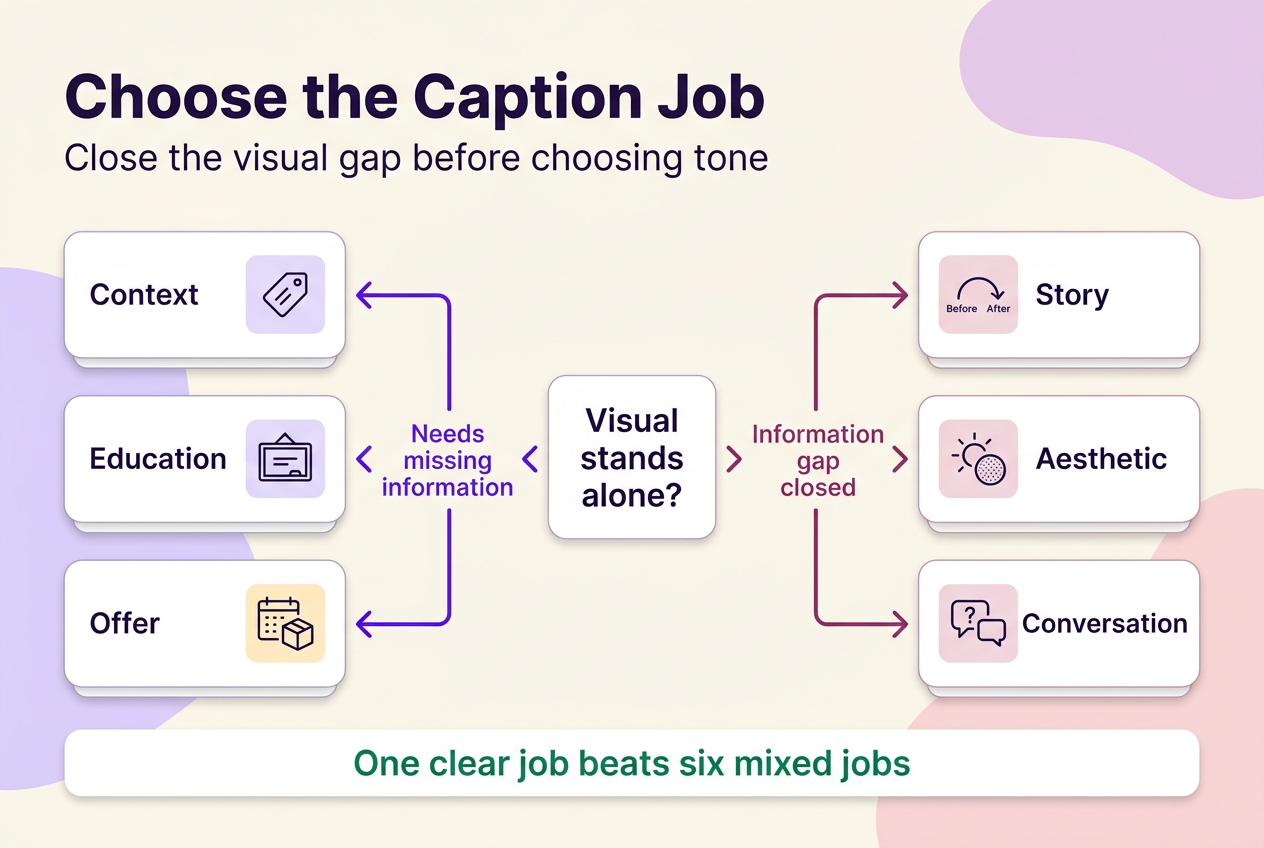
The distinction that matters more than tone is whether the visual can stand on its own. A caption’s job — context, story, education, aesthetic, offer, or conversation — should be chosen before any decision about voice, humor, or mood, because the wrong job produces a caption that reads fine and still fails the post.
| Caption job | Post goal | What the visual already shows | Audience familiarity needed | Suitable caption shape | Skip this job when |
|---|---|---|---|---|---|
| Context | Explain what’s happening or why it matters | Little to nothing on its own | Low — works for a new or mixed audience | One-line identifier or a short explanatory sentence | The image is already fully self-explanatory |
| Story | Make the moment memorable | A single frame or clip, no arc | Any — works for new or returning followers | A before/after or expectation-vs-reality shift | The moment has no real shift to describe |
| Educational | Teach or correct a specific point | Steps or data without framing | Medium — assumes some baseline interest | Outcome or misconception, plus one qualification, plus a pointer to the steps | The post already explains the point in full |
| Aesthetic | Set or support a mood | Strong visual atmosphere already present | Any — mood needs no prior context | A single sensory or atmospheric observation | The post needs to state a price, date, or warning |
| Offer | State availability or terms | Product or service shown, terms unstated | Medium to high — ready-to-act audience | Terms stated plainly plus one specific next step | Terms aren’t finalized or ready to publish |
| Conversation | Get a reply that shapes a real decision | Open question implied, not stated | Any — works best with an engaged audience | A specific question tied to an actual upcoming decision | There’s no real use for the replies you’d get |
The priority to set when a post doesn’t fit neatly into one row: check whether the visual can stand alone before checking tone. If a viewer would be confused, uninformed, or missing a term they need, context or education wins over aesthetic phrasing every time — a beautifully moody caption on a restock post that never states availability is still a failed caption. Aesthetic and conversation jobs earn their place once the post’s information gap is already closed; treat them as a finishing layer, not a starting point. A single post can combine two jobs — a story opening that ends with a business next step, for instance — but it rarely needs six, because a caption trying to do everything usually communicates nothing clearly.
How to write Instagram captions in five steps
The method stays the same whether the post is a carousel, a Reel, or a single photo. What changes between drafts is the detail you feed into it.
1. Start with the post’s one intended job
Name the job — context, story, education, aesthetic, offer, or conversation — using the matrix above, so every later decision serves that job instead of a generic mood.
2. Pull out one detail only this post can claim
Find a specific number, name, material, timestamp, or outcome the audience can’t get from any other post you’ve published. Genericness usually comes from skipping this step, not from weak sentence-level writing.
3. Add the context the visual cannot carry alone
Ask what a viewer without your background knowledge would ask, and answer only that. Over-explaining a self-evident image is as common an error as under-explaining a confusing one.
4. Match the opening, rhythm, and tone to the format
A Reel with a strong opening hook usually pairs with a shorter, punchier caption underneath it, while a carousel meant to be read slowly can carry more sentences without losing the viewer.
5. Edit for clarity, factual accuracy, and a non-pushy next step
Cut any claim you can’t stand behind. If the caption quotes someone else’s words or lyrics, remember that credit or a disclaimer alone doesn’t clear the rights to reuse them — Instagram’s own copyright guidance makes that point directly, and whether a specific quote is fair to use is still a fact- and jurisdiction-specific question.
Caption examples organized by what the post needs to do
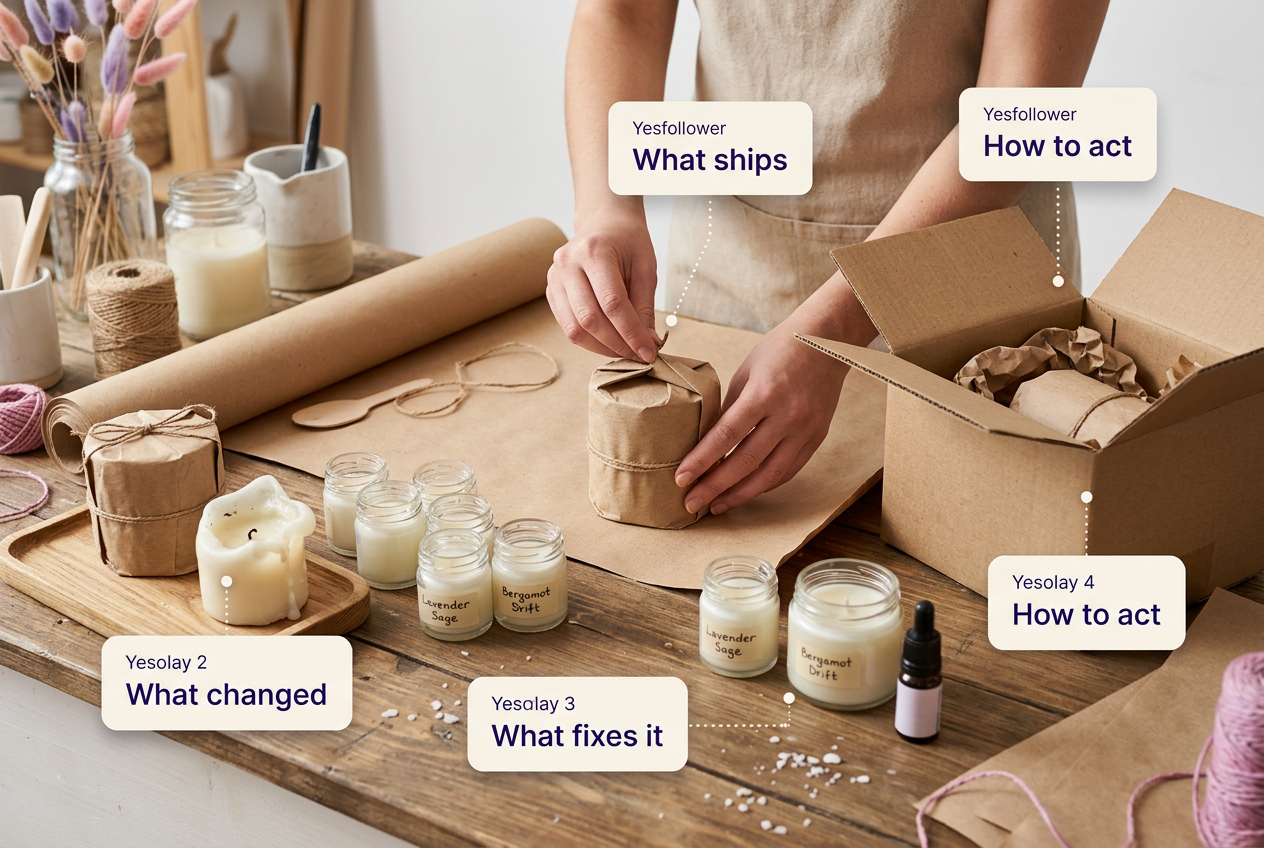
The fastest way to make caption examples generic is to hand out finished lines. What actually transfers between posts is the pattern behind the line — the job it does and where the specific detail sits. The examples below follow one recurring, illustrative situation — a small maker packaging handmade candle orders — so the same facts get written four different ways depending on what the post needs.
When the visual needs context
A context caption closes a gap a viewer can’t close on their own — what they’re looking at, why it exists, or what changed. For a behind-the-scenes Reel showing hands wrapping an order: “Every candle gets wrapped by hand before it ships — this batch goes out Thursday.” For a carousel cover with no obvious subject: “Six scents, one weekend of testing — swipe to see which one didn’t make the cut.” For a feed photo that’s genuinely self-explanatory, one line, or none, isn’t a weaker choice. Rewrite pattern: name what’s happening, then add the one fact — a date, a cause, a change — that the image alone can’t supply. Instagram’s automatically generated photo alt text, which a creator can replace, covers screen-reader description separately from whatever appears in the caption — the two aren’t interchangeable, so alt text shouldn’t be relied on to carry a message the caption itself needs to state.
When the post has a story behind it
A story caption is built around a shift, not a mood: expectation versus reality, before versus after, a problem versus the choice made about it. A short version can be one sentence — “Started this to fund a broken kiln; it paid for a second one instead.” A medium version adds the moment the shift became visible. A longer version can walk through the decision that caused it, as long as every added sentence earns its place rather than padding the moment. Rewrite pattern: state the before, name the shift, and land on what’s true now — cut anything that doesn’t serve that arc.
When the post teaches something
An educational caption shouldn’t retype the slides. Lead with the outcome or the misconception the post corrects, add the one qualification that matters, then point to where the usable steps actually live: “Most wick problems aren’t the wick — slide 3 covers the one measurement that fixes it.” A lesson recap can follow the same shape by stating what the lesson covered, not everything covered in it: “Today’s lesson was fractions through pizza slices — ask what ‘equal parts’ means and you’ll get the recap.” A service-process carousel works the same way: “Every custom order goes through three checks before it ships — swipe for the one most people skip.” Rewrite pattern: outcome or misconception, plus the one qualification, plus where the steps live. Plain-language phrasing that matches how an audience actually talks about the topic is a clarity choice for the reader in front of the post, not a documented way to change how Instagram surfaces it.
When the post needs a conversation or business next step
The difference between an invitation and pressure is specificity. “Which scent should we restock first — vote below” asks for something that will actually shape a decision. “Comment below!” with no reason attached asks for nothing in particular, which is why it reads as filler. A restock caption should state availability and how to act on it: “Back in stock Friday at 9am, first-come.” A service-based post should state how to inquire rather than implying it: “DMs open for October slots.” Rewrite pattern: state the specific ask or the availability, then say plainly how to act on it — no urgency language required. No specific wording pattern here is documented to move replies, follows, or sales.
Aesthetic Instagram captions: make the mood specific
The easiest mistake in an aesthetic caption is trading a real detail for a mood word. “Golden hour vibes” and “soft season” fit almost any photo, which is exactly the problem — a caption that fits everything says nothing about this particular post. An aesthetic caption still needs an anchor: a specific light, texture, sound, place, or time that belongs to this image, with a tone choice built around it rather than pulled from a generic phrase bank.
Take one scenario — a cup of coffee on a windowsill at dusk — and the anchor stays the coffee, the window, and the dusk light across every tone. Minimal: “Dusk, one cup, done.” Dreamy: “The light did most of the work tonight.” Soft: “Slow evenings still count.” Editorial: “Dusk light, unfiltered, six minutes before it was gone.” Moody: “The kind of quiet that doesn’t need company.” Each version reads differently, but each keeps the same concrete detail — that’s what separates a restrained caption from an incomplete one.
For Reels, write four text layers — not one caption
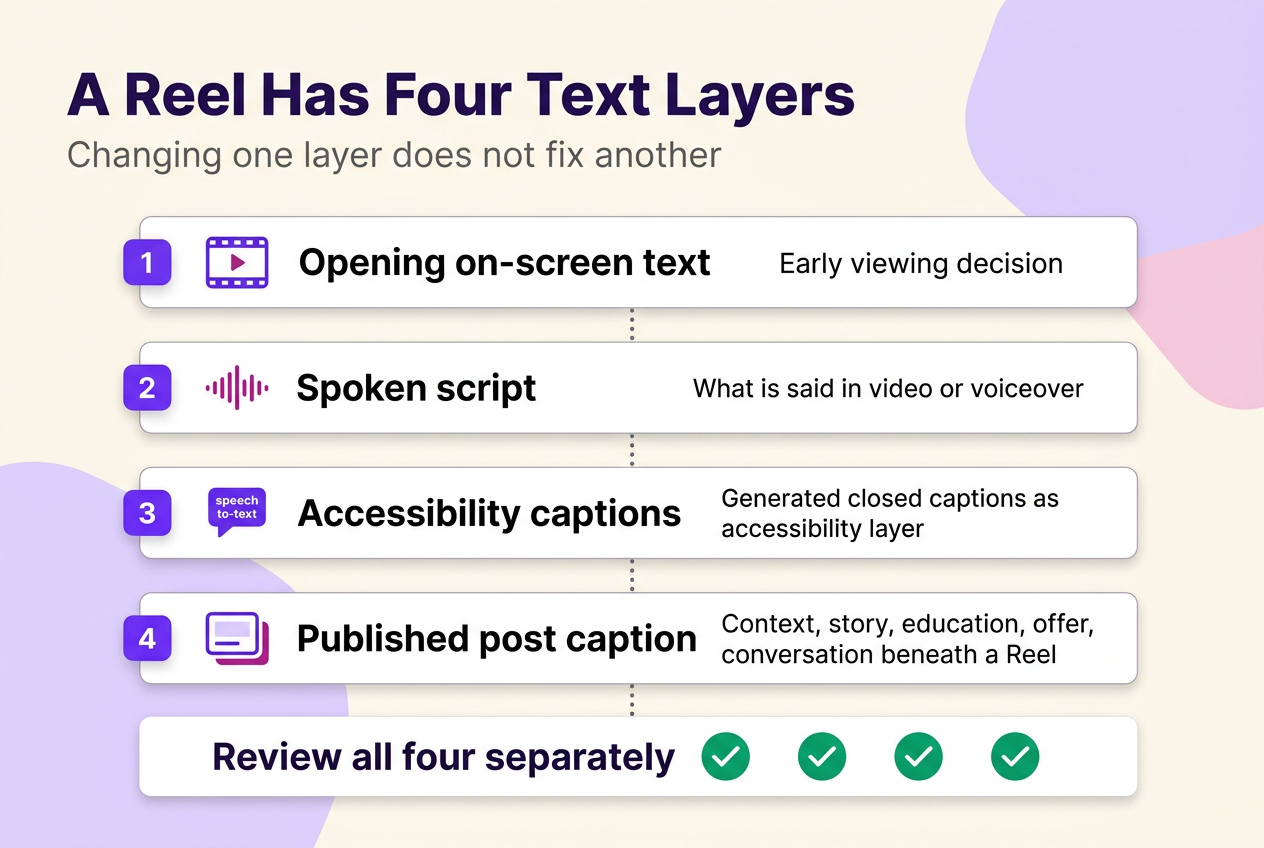
Instagram treats a post’s caption — the text you can add, edit, or delete on an existing post — as separate from anything attached to the Reel’s video track, and that distinction matters more than it sounds. Writers searching for Instagram Reels captions or the best captions for Instagram Reels are often really asking two different questions at once: what to write, and how to make the video’s audio accessible. A Reel written like a single caption usually skips one of four layers.
The opening on-screen text is what a viewer sees in the first second and decides, right there, whether to keep watching. The spoken script is whatever gets said on camera or in voiceover. Instagram Reels closed captions are a separate accessibility layer: Instagram uses speech-recognition technology to generate them automatically, and on supported mobile devices, creators can turn Reel closed captions and their translations on or off, either while creating the Reel or afterward. On-screen text typed into the Reel editor is a distinct, separate feature from that captioning system — adding text on screen doesn’t by itself make the Reel’s audio accessible the way generated captions do. The published post caption underneath the Reel is the fourth layer, and it’s the one that carries the context, story, or offer job described earlier in this guide.
Availability and the exact controls for enabling or reviewing captions aren’t established as universal across every account, so review the caption settings available in your own supported mobile Reel editor before publishing rather than assuming the same options apply everywhere.
Adapt the framework for teachers, creators, and small businesses
The underlying framework doesn’t change across audiences — job first, then tone — but what counts as “the detail only this post can claim” does.
For instagram captions for teachers specifically, the priority is context and care: what the activity was, what it practiced, and language that keeps individual students unidentifiable unless a school or district policy and a parent’s or guardian’s permission already cover that identification. A creator documenting a process should foreground point of view or the one takeaway from the work, rather than a generic “new video up” line that could sit under any post. A small business posting a client-facing update should pair one concrete detail — a date, a price, an availability window — with an honest next step, because vague business captions tend to create more follow-up questions than they prevent.
None of these are separate systems; they’re the same context, story, education, aesthetic, offer, and conversation choices applied with a different sense of what’s appropriate to share. Where a caption would identify a student, a client, or another private individual, checking the relevant school, workplace, or client policy first matters more than any wording choice that comes after.
Use a rotation system so captions don’t sound like templates
Templated captions usually aren’t a tone problem; they’re a repetition problem across five variables that rarely change together: the opening line, point of view, the type of detail offered as proof, sentence rhythm, and how the next step is phrased. Rotate one or two of these per post instead of rewriting the whole voice each time, and the account stops sounding automated without losing consistency.
A useful exercise is running one piece of content through four jobs to see how much actually has to change: the same product photo as a story (“This almost didn’t ship”), a teaching point (“Here’s the spec people ask about most”), an aesthetic observation (“Matte finish, morning light, no editing”), and a useful invitation (“Restocking Friday — which size first?”). The facts stay identical; only the job and the rotated variables move. Hashtags, when used, sit in the caption or a comment, and for public accounts they make that post visible on the hashtag’s page — that’s a placement fact, not a ranking one, and it doesn’t change which job a caption should be doing.
ChatGPT prompts for Instagram captions that still sound human
A caption tool is only as good as the brief it’s given. A prompt that just says “write 10 Instagram captions” produces exactly what that request implies — ten generic options with no job attached. A usable brief states the caption’s job, the specific facts to include, who’s reading it, any claims to avoid, the format, and how many distinct angles to return, not just how many lines.
A workable structure: “Write three [job] captions for a [format] about [specific fact]. Audience: [who]. Voice: [constraints]. Avoid: [claims or words].” Swap the bracketed job for context, story, education, aesthetic, offer, or conversation, and the same brief works across every post type in this guide. Five starting points worth adapting:
- Reel: “Write three context captions for a Reel about [specific fact from the clip]. Audience: [who]. Voice: [constraint]. Avoid: [claims]. Give each a different opening line — no two should start the same way.”
- Carousel: “Write three educational captions for a carousel about [the misconception or outcome]. Audience: [baseline knowledge level]. Voice: [constraint]. Avoid: retyping the slide content. Point to which slide holds the steps.”
- Aesthetic image: “Write three aesthetic captions for a photo of [the concrete anchor — light, place, object]. Voice: [minimal, dreamy, editorial]. Avoid: generic mood words like ‘vibes’ or ‘energy.’ Keep the same anchor detail in every version.”
- Teacher recap: “Write three context captions for a classroom activity about [what was practiced]. Audience: parents and colleagues. Avoid: naming or identifying individual students. Keep it to what the activity taught, not everything that happened.”
- Small-business update: “Write three offer captions for [product or service] about [date, price, or availability]. Audience: people ready to act. Avoid: urgency language and vague calls to action. State the next step plainly in each version.”
Generated drafts still need a human pass for accuracy, originality, and rights — a tool can produce a confident-sounding claim, quote, or statistic that isn’t actually true or isn’t actually yours to publish, and no caption tool clears that risk on its own.

Choose your caption branch and take the first step
Before publishing, confirm four things: the caption has one job, it states the specific detail only this post can claim, it’s accurate and appropriately permissioned, and any Reel it’s attached to has its accessibility captions reviewed rather than assumed. Pick the row from the matrix above that matches today’s post, apply the five-step method to it, and stop there — one well-matched caption beats a longer list of options that all do the same job.
 120,000+ creators say yes
 Real Active Accounts


 Username Generator
  Hashtag Generator
  Font Generator