
How to Remove Ghost Followers on Instagram Without Risky Bulk Tools
Remove suspected ghost followers by reviewing each flagged or unusual profile yourself and removing it with Instagram’s native Remove control — never a bulk-cleaning app — logging each decision as you go and working in small, resumable sessions rather than one purge.
An audit told you the follower list is padded, and now the practical question is what to press, in what order, and what it costs. The immediate cost is a lower displayed follower count: each account you remove no longer follows you, and a legitimate person you remove by mistake would have to decide to follow you again. This guide sorts out the order of operations, which accounts genuinely deserve removal, and how to read your numbers for the weeks afterward without inventing a story about reach. The framing stays narrow throughout: a cleanup does not create distribution — it gives your follower-based numbers a denominator you can trust again.
Remove ghost followers manually in small, reviewable stages
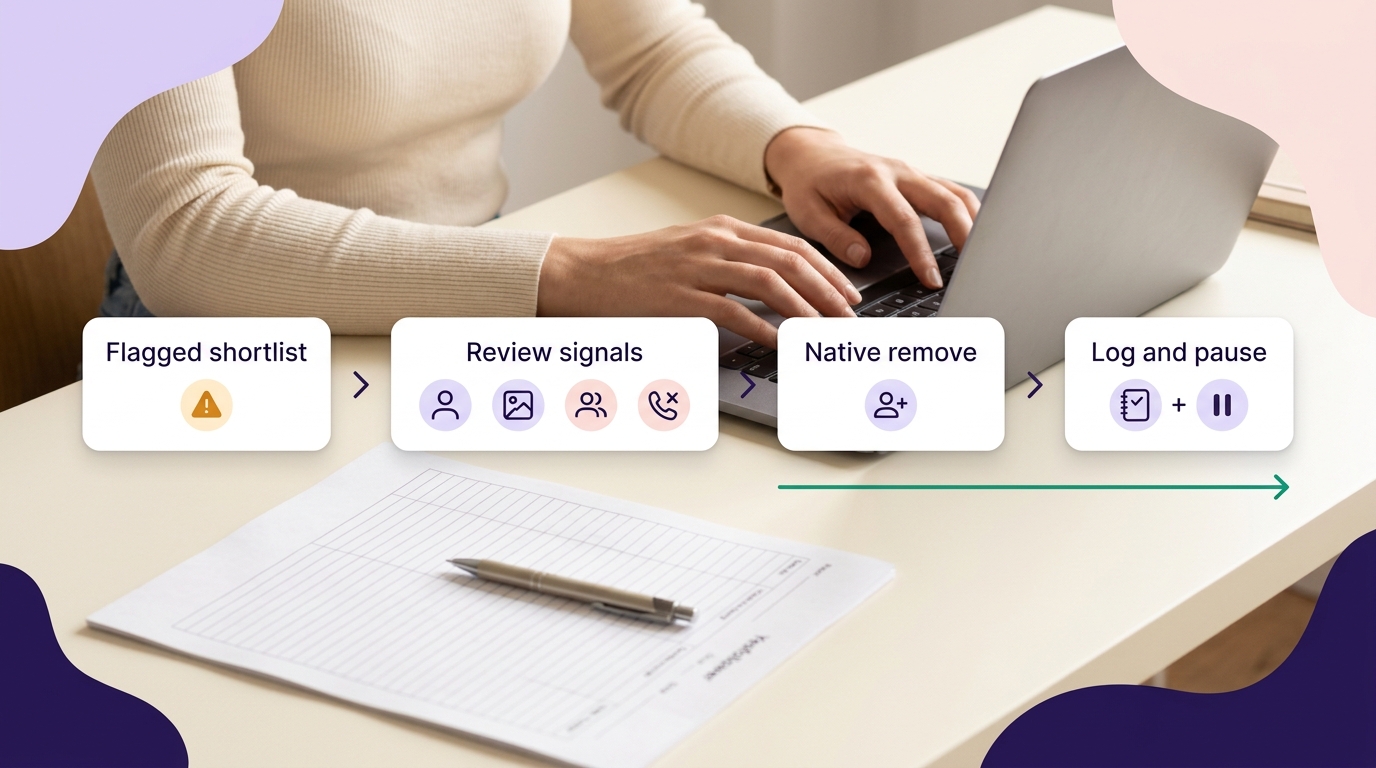
Work through these five moves for the accounts you decide to review:
- If you see a flagged-follower list, start there. Meta’s business documentation describes a “Flagged for review” notice in the Followers section, where accounts likely to be spam or irrelevant are grouped, with options to remove all, remove them one by one, or mark an account “Not spam or irrelevant” if the flag is wrong. Availability varies by app version, account type and region, so treat it as a starting shortlist when it appears, not a required first step.
- Open each remaining profile before deciding. A row in the follower list shows only a username and an avatar; the decision belongs on the profile itself, where you can check the bio, the posts, and the follow ratio against the four signals covered below.
- Use the native control. Instagram’s Help Center documents the desktop path for removing a follower: go to your profile, click Followers, click Remove beside the account, then confirm Remove.
- Write the account and your reason down before moving on. One line per removal — handle, date, reason. This is the record that lets you explain your own follower numbers later.
- End the session while you’re still reading carefully. When you notice yourself skimming profiles rather than reading them, close the tab and pick it up another day.
Author’s judgment: Handle clearly unwanted accounts first — spam commenters, anything already flagged, obvious bot profiles — then pause before deciding on ambiguous, quiet accounts. A false positive costs you a real reader who has to decide to follow you again; a slower cleanup costs you nothing but a second sitting.
What removing a follower does and does not do
Removing a follower ends their follow of you; unfollowing is the separate action that ends your follow of someone else, from their profile’s Following button. Instagram’s documentation states a removed account is not notified, and removal does not block them: if your profile is public, they can still view your public content, and they can send a new follow request unless you block them. If you need to stop an account from seeing your posts and stories or finding your profile in search, that is blocking — a separate, stronger control covered next.
Use blocking or reporting only when the account’s behavior requires it
Blocking is for one specific account whose access or contact you need cut off; reporting is for telling Instagram that an account or its content may break the rules. The Community Guidelines name the relevant behaviors — spam, artificially collecting likes, followers or shares, impersonation, other inauthentic activity — and those are what a report answers. A quiet account is neither. Using the report flow as a bulk label for low-engagement followers puts noise into a system built for behavior, and does nothing to change the follower list either way.
Ghost followers are a review category, not a diagnosis
“Ghost follower” is a practitioner term, not a platform one: Instagram’s documentation doesn’t use it, and its guidance covers spam, bot and policy-violating accounts rather than quiet followers as a category. Treat the label as a shortlist you build yourself, and check it against a profile only when several signals line up:
- Profile identity: no bio, no photo, a mass-produced-looking username.
- Content pattern: repetitive or spammy posts, or no posts at all.
- Ratio: a follow-to-follower balance that makes no sense for that kind of account.
- Actual unwanted contact: spam comments or DMs — the strongest signal of the four, and the only one that reflects behavior rather than appearance.
Instagram has named a couple of patterns it associates with potential inauthentic activity — a majority of followers based in a different country, and signs of automation — in a blog post describing the authenticity checks it may run against suspected accounts. That is a description of its own verification process, not a test you can apply to a single follower: no single trait, and no single quiet account, proves that an account is fake. Retain quiet, real-looking followers, and prioritize the ones showing actual unwanted contact.
Why a one-day purge makes review and measurement harder
An illustrative case: a food creator with roughly 12,000 followers clears several hundred accounts in one sitting, and within a week the follower number has moved by a different amount than she removed. She can’t explain the gap, because several things can move that number at once: her own removals, ordinary unfollows, and Instagram’s own removal of inauthentic follows, which the platform has documented as an enforcement practice against accounts that use third-party apps to inflate their popularity.
As of August 2026, Instagram’s public documentation does not state a daily or hourly limit on removing followers and does not recommend a pace, so tempo is a risk-control choice you make, not a rule you comply with. What paced sessions buy you is fewer rushed calls on ambiguous profiles, and a running tally — reviewed, removed, blocked, reported — that turns a later count change from a mystery into arithmetic you can check.
A lower follower count is expected — it is not a reach verdict
The common mistake here is reading the smaller number as a punishment. It isn’t: a lower count is the direct arithmetic result of removing accounts, nothing more. Instagram’s documentation does not state that removing followers changes reach or distribution in either direction.
No method guarantees a specific number of followers, views or income. Results depend on niche, content quality and account history.
What a cleanup changes is the denominator in ratios you calculate yourself. One trap worth naming: comparing a Reel published after the cleanup against a Feed photo published before it tells you nothing about the cleanup, because the format and the surface differ, not just the audience size.
Engagement rate may rise because the denominator shrank, not because response grew
If your engagement-rate formula divides interactions by follower count, that percentage can climb after a cleanup with zero change in what your audience actually did. Illustrative figures only, not a benchmark: 50 likes ÷ 1,000 followers × 100 = 5%; after removing 200 accounts, the same 50 likes ÷ 800 followers × 100 = 6.25%. The numerator never moved.
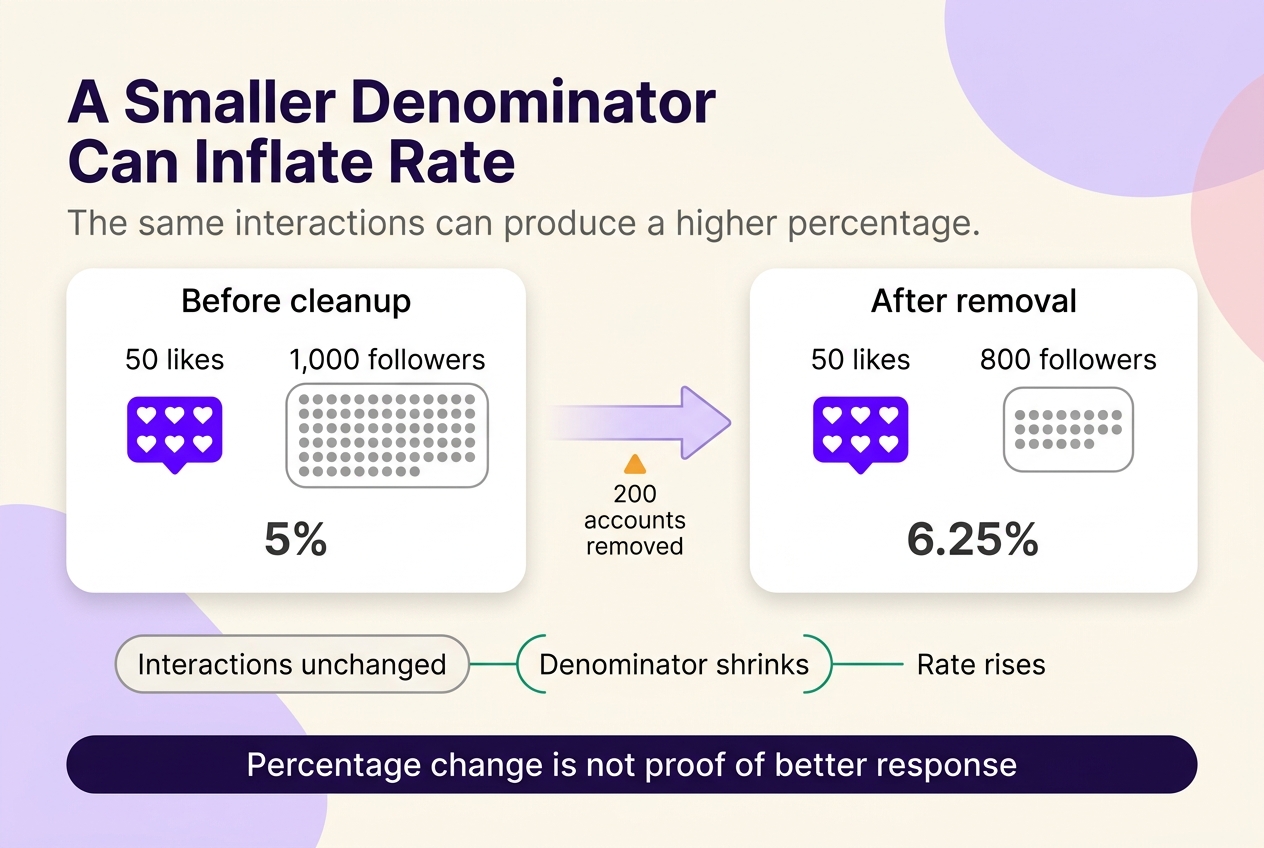
Instagram’s Insights documentation defines counts — Accounts reached, Accounts engaged, Total followers — but does not define any follower-based engagement rate. That formula is yours, which means you carry the labelling burden: state the numerator (which interactions you counted), the denominator (follower count on which date), the surface, and whether delivery was organic or paid. An unlabelled engagement-rate figure can’t be compared with last month’s, because you no longer know whether the two were built the same way.
Compare reach, views, and follower-based ratios separately
Keep four things on separate lines: Total followers, Accounts reached, views, and your own engagement-rate calculation — and keep organic and paid delivery apart. Instagram defines Accounts reached as the number of unique accounts that saw your content on screen at least once; views are a separate count Instagram reports for a piece of content and shouldn’t be treated as the same measurement. Professional accounts open Insights from the Professional dashboard; on the web, select Dashboard, then Insights under For professionals, with ranges of the last 7, 14, 30 or 90 days or a custom window inside the past 90 days. The dashboard requires a public account, and a public personal account sees Your dashboard instead.
| Metric | What it measures | What changes when you remove followers | What it does not prove |
|---|---|---|---|
| Total followers | Accounts currently following your profile | Falls by the number you removed | Anything about who saw your content |
| Engagement rate (your own formula) | Chosen interactions ÷ follower count on a stated date | Rises when the denominator shrinks, with identical interactions | That audience response improved |
| Accounts reached | Unique accounts that saw your content on screen at least once | Instagram does not document a direct effect from follower removal | Why reach moved in either direction |
| Views | A separate content-level count Instagram reports | Instagram does not document a direct effect from follower removal | That a unique number of people viewed it; views aren’t the same measurement as Accounts reached |
When you should not clean up Instagram followers
Skip the cleanup entirely when the only evidence is weak engagement, when the profiles look like real people and nothing else is wrong, when you can’t give each profile a proper look today, or when the live problem is security or account standing — check Account Status, which covers Community Guidelines issues and whether your content is eligible to be recommended, and resolve that first. The stopping rule is evidence quality, not follower count: the moment you’re guessing from an empty profile, stop rather than lower your bar for “suspicious.”
Use a post-cleanup baseline to make your next content decision
Record a dated baseline before you touch anything: follower count, Accounts reached for a defined window, and your engagement-rate figure with its four labels. Afterwards, compare a defined set of later posts against earlier ones matched by format, delivery type, and window length — Reels against Reels, organic against organic, 30 days against 30 days. The comparison, not the fact that a cleanup happened, is what your next content decision rests on.
Two habits keep that comparison honest. Change one material content variable at a time across the window where you practically can, so a result has one candidate explanation rather than several. And never let a single unusually strong or weak post stand as the verdict — one post is a data point in a set that isn’t finished yet.
Reduce future suspicious follows without handing account access to bulk tools
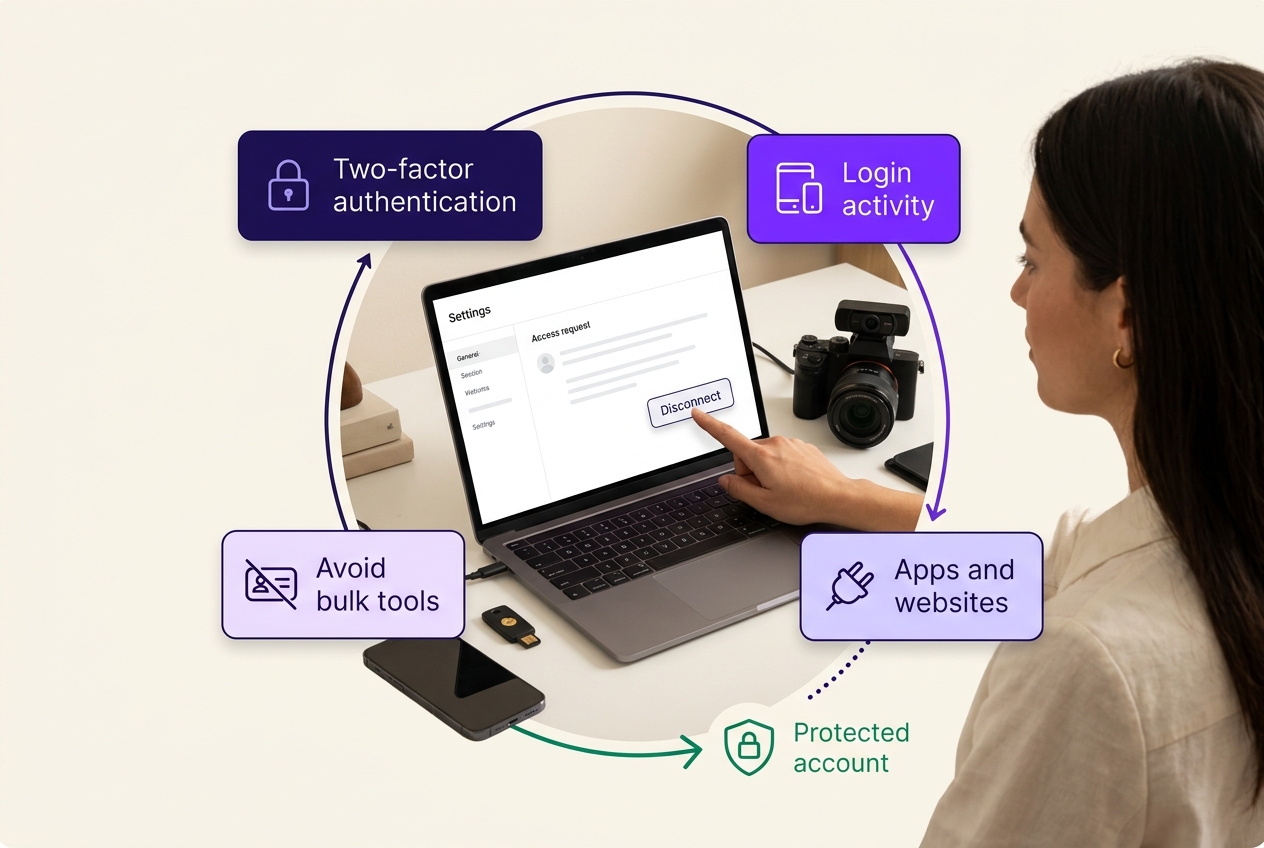
Going private is the reflexive answer. On a private account you approve each follow request yourself, but Instagram does not claim that approved followers are genuine — it only requires that a request be confirmed before it counts. Weigh that against what public discovery does for your account before making the switch. Four checks are worth more than a blanket privacy change:
- Match your privacy and follower-approval settings to what the account is actually for, rather than to a default assumption that private is safer.
- Secure account access with two-factor authentication and a pass through Login activity, where you can mark a session as recognized or not and log out of devices you don’t recognize.
- Review connected third-party apps and remove the ones you no longer recognize or use, via Apps and websites in your Meta account. Removing the connection ends that app’s future access; what it already holds is governed by its own privacy policy, not by Meta’s.
- Avoid artificial-growth and automated-cleanup services that ask for your login credentials. Artificially collecting followers is against the Community Guidelines, and Instagram has said it removes inauthentic likes, follows and comments from accounts that use third-party apps to boost popularity — a policy and enforcement fact, separate from any claim about how a specific tool affects distribution.
Plan the cleanup around clearer data, not a promised reach rebound
Treat this as a staged plan rather than a bet on reach: fix your removal order, keep the log, set your baseline before the first removal, then decide from like-for-like comparisons. The payoff is a follower number you can divide by again and believe the answer — which is what puts your next content decision back on evidence.
 120,000+ creators say yes
 Real Active Accounts


 Username Generator
  Hashtag Generator
  Font Generator